



Mendix helps organizations build web and mobile applications faster through a visual, low-code approach. By replacing most of the manual coding with visual models and reusable components, it lets business and development teams turn ideas into working applications more quickly. But delivering a mobile app still involves platform-specific processes such as building, code signing, testing, distribution, and publishing. Without an efficient delivery workflow, these steps can become a bottleneck even after development is complete.
In this article, we'll cover what Mendix is and why teams use it, then show how combining Mendix with Appcircle streamlines mobile app delivery from build to app store release.
Appcircle is now part of the official Mendix documentation as a supported way to build, distribute, and publish Mendix native mobile apps.
What Is Mendix?
Mendix is a low-code application development platform that helps organizations create and manage business applications. Instead of building every interface, workflow, data model, and integration entirely through traditional code, teams can use visual models, reusable components, templates, and drag-and-drop development tools.
Mendix is used across four common application types: operational efficiency apps that automate manual processes, customer engagement apps, legacy system modernization, and innovation apps that use technologies like IoT and AI, alongside web and native mobile applications that integrate with enterprise systems.
Mendix is not limited to simple no-code use cases. Professional developers can extend applications with custom logic, integrations, and reusable modules when needed.
Key Benefits of Mendix
Mendix builds on three core principles, speed, collaboration, and control, which shape the benefits teams see in practice:
- Faster application development: Visual modeling, reusable components, templates, and prebuilt modules can reduce the need to create common application functionality from scratch.
- Better business and IT collaboration: Visual workflows, data models, and application pages make it easier for business stakeholders and developers to review and understand application behavior together.
- Reusable components: Teams can reuse modules, integrations, interface elements, and application templates across multiple projects.
- Rapid prototyping: Ideas can be turned into working applications more quickly, allowing teams to collect feedback and refine requirements earlier.
- Support for complex business processes: Mendix can be used for workflows, system integrations, process automation, and applications that connect different teams and enterprise systems.
- Web and mobile development: Organizations can create web, progressive web, and native mobile experiences within the same development platform.
- Extensibility: Professional developers can add custom logic and components when low-code functionality does not fully meet the application requirements.
- Governance and portfolio consistency: Version control, role-based access, and application lifecycle management, combined with shared components and development standards, help teams maintain quality and consistency as their application portfolio grows.
These advantages hold across the full range of Mendix applications, including the native mobile apps that this article looks at more closely.
From Mendix Native App to Mobile Delivery
Mendix supports native mobile applications for iOS and Android. These apps are based on React Native and use native user interface elements instead of running inside a web view, which lets teams build experiences with native navigation, gestures and animations, offline functionality, push notifications, camera and location access, and other device-specific features. In other words, Mendix's visual, model-driven approach extends to applications that run directly on mobile devices.
Delivering those apps, however, still involves platform-specific requirements that sit outside the low-code development experience. After you generate the native project in Mendix and connect it to a Git repository, several steps remain before the app reaches testers or production users. Teams may need to:
- Configure iOS and Android builds
- Manage Apple certificates, provisioning profiles, and Android keystores
- Set up different application environments
- Generate signed IPA, APK, or AAB files
- Share builds with testers
- Distribute releases to app stores or internal channels
When these activities rely on individual developer machines and manual handoffs, teams not only lose some of the speed gained during application development but also make the delivery process harder to secure and control.
This is where a mobile CI/CD platform becomes important.
How Appcircle Complements Mendix for Mobile CI/CD

Appcircle supports four main stages of delivering a Mendix native mobile application:
- Building the iOS and Android applications
- Managing platform-specific code signing
- Distributing builds to testers and internal users
- Publishing approved releases to application stores
Let's look at how setting up Mendix and Appcircle together works in practice.
A Typical Mendix and Appcircle Workflow
Consider a team building a mobile field service application in Mendix. The application experience, business logic, data model, and integrations are developed in Mendix. Since Mendix native mobile applications are React Native-based, Appcircle uses separate React Native build profiles for iOS and Android.
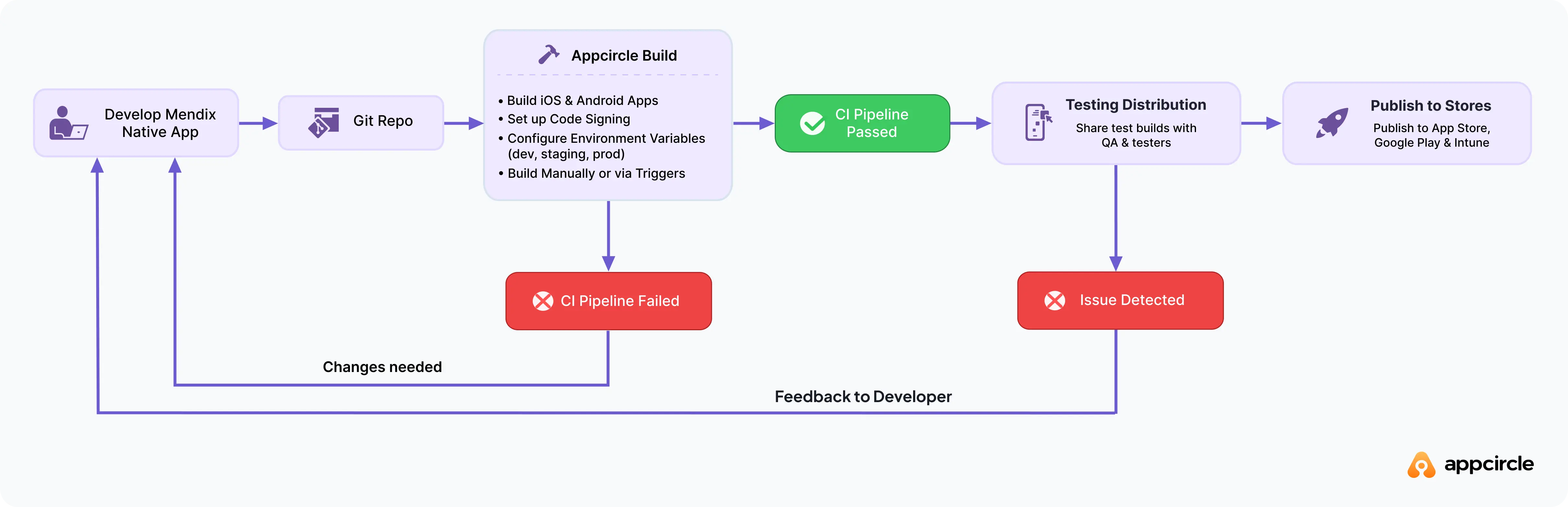
Using the Mendix Native Mobile Builder and Appcircle together, the end-to-end mobile delivery process then looks like this:
- Create the Native Mendix Project.
- Push the project to a Git repository.
- Create separate iOS and Android build profiles and connect the repository.
- Configure your build settings based on your project.
- Manage code signing and environment variables for iOS and Android.
- Customize your build workflow with ready-to-use integrations.
- Build your app manually or automatically by using triggers.
- Share test builds with QA and testers.
- Customize your publish flow and submit production releases to public app stores, or to MDM tools like Microsoft Intune.
In simple terms:
Teams develop the application in Mendix. Appcircle then builds, signs, distributes, and publishes it to users through app stores.
Setting this up once means every future release follows the same path, which is where the main benefits of pairing Mendix with Appcircle come in.
Benefits of Using Mendix with Appcircle
Bringing Mendix and Appcircle together produces benefits that cover the full mobile app release cycle:
- Extend low-code speed into delivery: Automated build and release workflows help teams preserve the speed gained during Mendix development.
- Manage iOS and Android in one platform: Building, signing, distributing, and publishing for both platforms happen in the same mobile CI/CD environment instead of separate tools.
- Reduce reliance on local machines: Each build runs in a clean, isolated environment rather than on individual computers, giving you consistent results while keeping signing assets and secrets secure.
- Keep environments separate: Mendix apps connect to each environment through a runtime URL, and Appcircle's environment variables help you manage separate development, test, and production builds.
- Centralize code signing: Manage Apple certificates, provisioning profiles, and Android keystores through the same dashboard, and re-sign existing binaries without rebuilding.
- Distribute builds to testers instantly: Builds can be shared with selected tester groups through Appcircle Testing Distribution, including authentication options such as LDAP and SSO, without going through the app stores.
- Stay in control of releases: Customize your publish flow to match your organization's release requirements, add approval gates between steps, and publish to public stores including the App Store, Google Play, and Huawei AppGallery, or to MDM tools like Microsoft Intune.
- Distribute through your own enterprise app store: Many Mendix apps are built for internal use rather than public release, so you can distribute them privately to your organization through the Appcircle Enterprise App Store.
- Governance and observability: Manage permissions with role-based access control, and track every action through audit logs and reports across all modules, from build to publish.
Taken together, these benefits give enterprises the consistency, control, and governance that mobile delivery at scale requires.


Conclusion: From Low-Code Development to Centralized Mobile CI/CD
Mendix gives organizations a visual, collaborative way to build web and native mobile applications, letting business and development teams turn ideas into working software quickly. Appcircle picks up from there, turning the platform-specific work of releasing a mobile app into an automated pipeline that handles building, signing, distribution, and publishing for both iOS and Android within a single mobile CI/CD platform.
Used together, Mendix and Appcircle connect rapid low-code development with a delivery process that is repeatable, secure, and centralized, from the first build to the app store release. With Appcircle now part of the official Mendix documentation, the setup path for each stage is available directly to Mendix teams looking to bring consistency and control to how their mobile apps are released.
Check out the Mendix documentation to get started:
- Build a Mendix Native App with Appcircle
- Distribute a Mendix Native App with Appcircle
- Publish a Mendix Native App with Appcircle
Frequently Asked Questions
1. What is Mendix used for?
Mendix is used to develop and manage applications with a visual, low-code approach instead of hand-coding every layer. Teams use it to automate manual processes, modernize legacy systems, engage customers, and create innovative apps that connect to enterprise systems, across both web and mobile.
2. What is a Mendix app?
A Mendix app is an application built on the Mendix low-code platform using visual models, reusable components, and drag-and-drop tools rather than traditional code. A Mendix app can be a web app, a progressive web app, or a mobile app for iOS and Android, and professional developers can extend it with custom logic and integrations when needed.
3. What apps are built with Mendix?
Mendix is used across four common application types: operational efficiency apps that automate manual processes, customer engagement apps, legacy system modernization, and innovation apps that use technologies like IoT and AI. These range from internal business tools and portals to field service apps and customer-facing mobile apps.
4. Is Mendix a no-code platform?
No. Mendix is a low-code platform. While many application components can be created visually, developers can also extend applications with custom code, integrations, and reusable modules when more advanced functionality is required.
5. Does Mendix include CI/CD capabilities?
Mendix provides development and deployment capabilities, but mobile applications still require build automation, code signing, testing, and store publishing workflows. Many teams use dedicated mobile CI/CD platforms such as Appcircle to automate these processes.
6. Can I build Mendix native mobile apps with Appcircle?
Yes. After you prepare the Native Mendix Project for your app with the Mendix Native Mobile Builder and store it in a Git repository, you connect that repository to Appcircle and create React Native build profiles for iOS and Android. From there, Appcircle can build the apps, share them with testers, publish to the App Store, Google Play, and Huawei AppGallery, or distribute them in-house through an enterprise app store and MDM tools like Microsoft Intune.
7. What are the benefits of using Mendix with Appcircle?
Using Mendix with Appcircle helps teams automate mobile app builds, centralize code signing, distribute builds to testers, publish applications to the app stores, and standardize mobile CI/CD workflows across projects.
8. Is Appcircle officially supported by Mendix?
Yes. Appcircle is documented in the official Mendix documentation as an option for building, distributing, and publishing Mendix native apps.