



Most enterprise security programs are built around infrastructure you control. A mobile app is the opposite: it is a file you hand to devices you will never see, on networks you do not manage, where anyone can unpack it and look inside. A forgotten test credential, an overbroad permission, and an analytics SDK nobody approved: whatever went into the binary goes out with the release.
Yet mobile security review is still one of the last things to happen in a release. Findings arrive after the date is committed, which turns security into a scheduling problem: delay the release or go ahead with it anyway. Moving the check into the pipeline removes that trade-off.
This article covers what SAST, DAST, and SCA actually mean for mobile apps, how source code analysis and binary analysis answer different questions, and how to run both automatically on every build using MobSF (Mobile Security Framework), the open-source security suite built for mobile, available as two ready workflow steps in Appcircle.
Why Mobile App Security Matters
A web application lives on servers you own. You can patch it in an afternoon, put a WAF in front of it, and watch its traffic. A mobile app is released, not hosted: once a version is published, it sits on user devices until those users choose to update, and every one of those copies is available for inspection by anyone curious enough to pull it apart.
That changes what a vulnerability costs. A hardcoded API key in a backend service is an incident. The same key in a released mobile binary is an incident plus a credential rotation, a forced update, and weeks of users still running the vulnerable version. Meanwhile, the pressure keeps building: app store review, enterprise customer security questionnaires, and sector regulations in finance, healthcare, and the public sector all now ask, in one form or another, how you verify what you release.
SAST vs DAST vs SCA for Mobile Apps
Three families of automated testing cover most of that verification. They are complementary rather than competing, and knowing which question each one answers makes it much easier to see where the gaps in a program are.
- SAST (Static Application Security Testing) examines the application without running it: Swift and Objective-C sources, Kotlin and Java, the Android manifest, iOS property lists, and the compiled APK or IPA. Because it needs neither a device nor a working backend, it can run on every commit and point at an exact file and line. It is the earliest and cheapest signal, at the cost of some false positives.
- DAST (Dynamic Application Security Testing) tests the app while it runs on a device or emulator, looking at how it behaves in practice: what it writes to local storage, how it handles sessions and certificates, and what it sends to your backend over the network. It needs an installed build and a live environment, so it runs later and less often.
- SCA (Software Composition Analysis) inventories the third-party libraries and SDKs your app pulls in through CocoaPods, Swift Package Manager, Gradle, or a vendor's SDK drop and flags versions with known vulnerabilities or incompatible licenses. Most of a modern mobile app is code somebody else wrote, and those SDKs are updated on the vendor's schedule rather than yours, which makes this the layer that covers the largest surface by volume.
| SAST | DAST | SCA | |
|---|---|---|---|
| Examines | Source code and compiled binaries at rest | The app running on a device or emulator | Third-party libraries and SDKs |
| Runs | On every commit or build | Against an installed build, later in the cycle | On every commit or build, and again as new CVEs are published |
| Best at | Insecure code patterns, secrets, misconfigured manifests | Runtime, session, and network behavior | Known vulnerabilities in dependencies |
| Blind spot | Runtime behavior | Code paths a test run never reaches | Code your own team wrote |
MobSF sits in the SAST family, purpose-built for mobile. Its binary analysis also surfaces part of what SCA and DAST would otherwise reveal, such as the permissions, trackers, and network configuration that dependencies contribute, which makes it an unusually broad starting point for teams that do not yet run all three.
What Is MobSF?

MobSF is an open-source security suite built specifically for mobile applications. Unlike general-purpose scanners that treat a mobile project as just another repository, it understands the platform: Android manifests and permission models, iOS binaries and their protections, signing certificates, network security configurations, and the mobile-specific mistakes generic tooling misses.
Because MobSF is open source, it runs entirely inside your own pipeline: no per-scan fee, and no requirement to upload an unreleased app to a third-party service.
Standards Mapping: CWE and OWASP MASVS
The practical difference between a scanner and a security program is often just whether the output means anything to the people who have to act on it. MobSF maps its findings to two widely recognized references. CWE identifiers name the class of weakness behind a finding, so an issue can be tracked, compared, and prioritized using the same taxonomy your security team already applies everywhere else. OWASP MASVS, the Mobile Application Security Verification Standard, describes what a secure mobile app is expected to do across storage, cryptography, authentication, network communication, platform interaction, code quality, resilience, and privacy.
For enterprise teams, that mapping is what turns scan output into evidence. A report tied to recognized standards answers a customer questionnaire or an internal audit directly, instead of arriving as a tool-specific list somebody has to translate first.
In a report, the mapping shows up as the list of controls a scan triggered, with the findings behind each one, so a reviewer can see which part of the standard the app is falling short on.
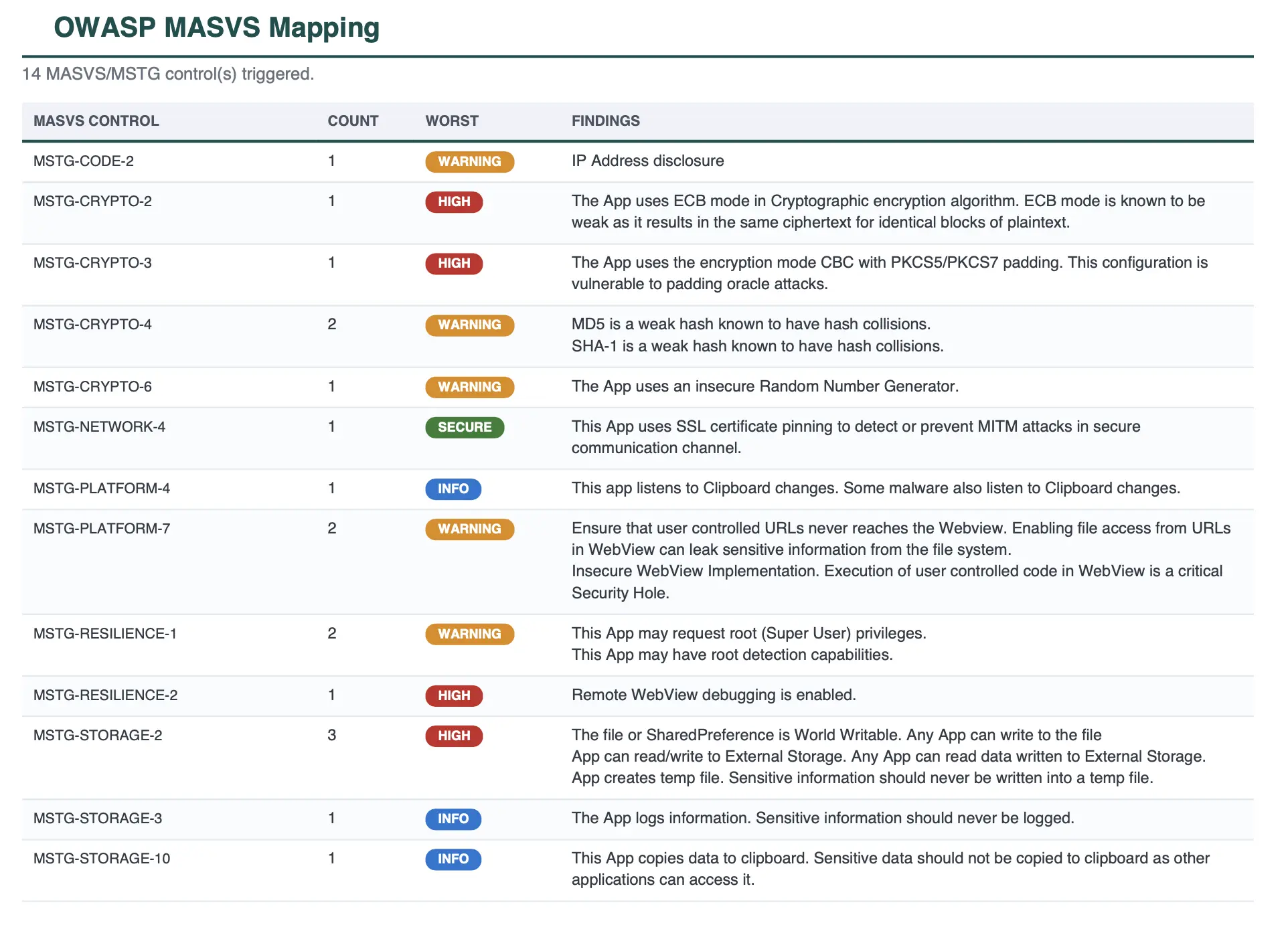
Example MASVS mapping from a MobSF report. Sample data, shown for illustration.
Source Code Scan vs Binary Scan: Two Different Questions
The two steps are often treated as alternatives. They are not; they answer different questions, and mature teams run both.
MobSF Source Code Scan asks, "What did we write?" It analyzes the source in your repository (Java, Kotlin, Android XML, Swift, and Objective-C) and reports the file, the line, the rule, and the severity of every finding. Because it only needs code, it runs before the build, early enough that a developer can fix the issue in the same pull request that introduced it.
Each run also produces a summary of where the build stands, so the result can be read at a glance before anyone opens the detail.
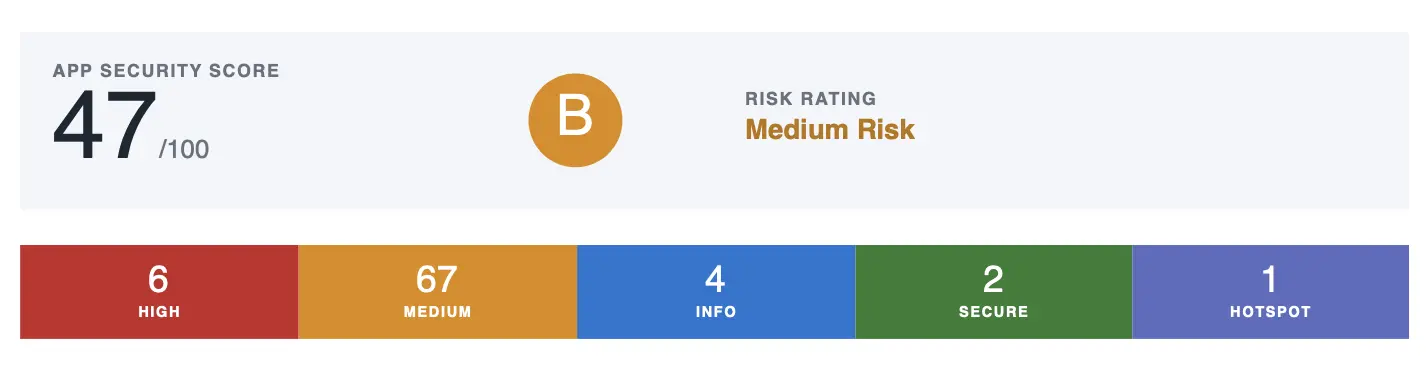
Example report summary from a MobSF scan. Sample data, shown for illustration.
| Area | What it catches | What the report shows |
|---|---|---|
| Leaked credentials | API keys, tokens, and passwords written into code or resource files | A live maps key, AIzaSyD...3kQ in strings.xml, reported with its file and line |
| Weak cryptography | Outdated algorithms such as MD5, DES, and RC4, and predictable random values | MD5 hashing user passwords, which current hardware breaks in seconds |
| Network handling | Certificate validation switched off, cleartext HTTP allowed, no pinning | A trust manager that accepts every certificate, so traffic on public Wi-Fi can be read and changed |
| Injection and unsafe input | Database queries built from user input, unsafe deserialization, command execution | Text typed by the user concatenated into a rawQuery call |
| WebView risks | JavaScript bridges, local file access, and remote debugging left enabled | setJavaScriptEnabled(true) plus a bridge, letting a loaded page call device functions |
| Storage and logging | Sensitive values written to logs, unencrypted local storage, clipboard exposure | A session token passed to Log.d, where other apps on the device can read it |
| Standards mapping | CWE and OWASP MASVS references attached to every finding | CWE-798 on that hardcoded credential, next to the file, line, rule, and severity |
MobSF Binary Scan asks, "What are we actually releasing?" It analyzes the compiled APK, AAB, or IPA and reports the requested permissions, the signing certificate, binary protections, the network security configuration, embedded secrets, the trackers present in the app, and a scored security assessment. This is the same view an app store reviewer, a customer's security team, or an attacker gets from the file you distribute.
The report leads with the findings that carry a release decision, each tagged with the part of the app it came from.
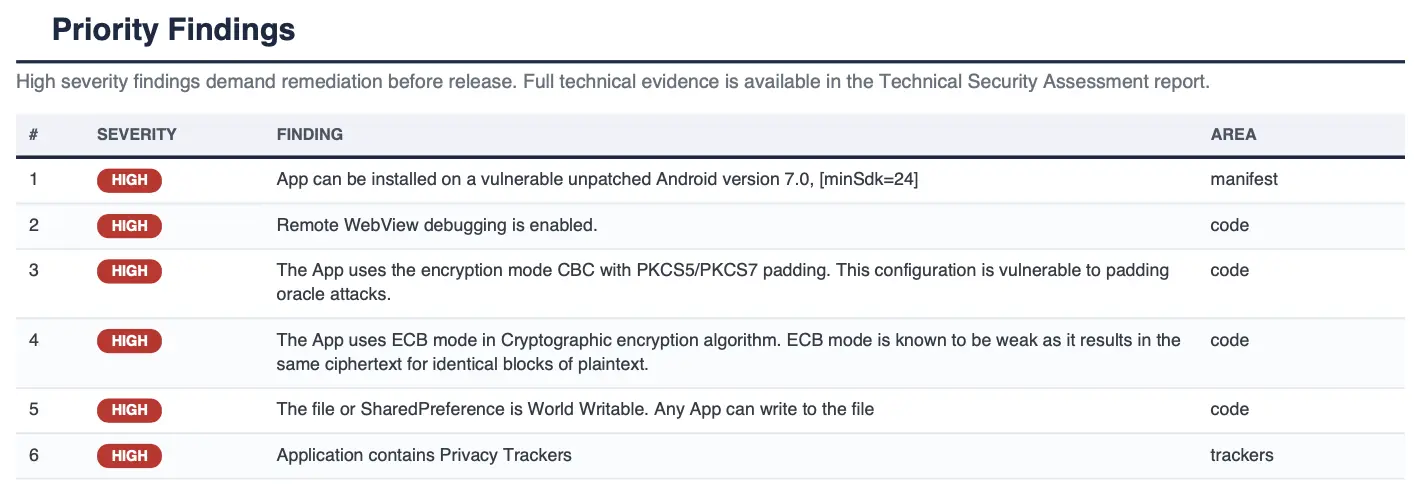
Example priority findings from a MobSF report. Sample data, shown for illustration.
| Area | What it catches | What the report shows |
|---|---|---|
| Permissions | Everything the app asks for at install time, including what dependencies added | READ_SMS requested but never used, a common reason for store rejection |
| Signing and certificate | Debug certificates and outdated signature schemes | A release signed with a debug certificate, which anyone can repackage |
| Third-party trackers | Analytics and advertising SDKs embedded in the app | Seven ad and analytics trackers found, to check against your privacy notice |
| Secrets in the package | Keys, certificate files, and backend addresses compiled into the app | A client.p12 key file and a forgotten test-api.company.local address inside the build |
| Network configuration | The transport rules the app carries, such as cleartext and ATS exceptions | NSAllowsArbitraryLoads enabled, undoing the platform's HTTPS requirement |
| Hardening and resilience | Compiler protections in native libraries, obfuscation, debug and backup flags | debuggable=true left on, so the running app can be inspected on a device |
| Reputation checks | Suspicious behavior combinations and known-bad domains or files | An SMS read paired with a background upload, and a domain on a known malicious list |
| Score and standards | A security score out of 100 with CWE and OWASP MASVS references | A single number such as 42 out of 100 per build, with the standard on each finding |
That second perspective catches a class of problems source analysis structurally cannot. A permission added by a third-party SDK, a tracker pulled in through a transitive dependency, a debug configuration that survived into the release build: none of these appear in code you wrote, but every one of them reaches your users.
How to Automate MobSF Scanning in Your Appcircle Pipeline
Both scans are available as ready steps in the Appcircle workflow editor, so adding security scanning means dropping the steps into an existing pipeline rather than provisioning a scanner and maintaining scripts around it.
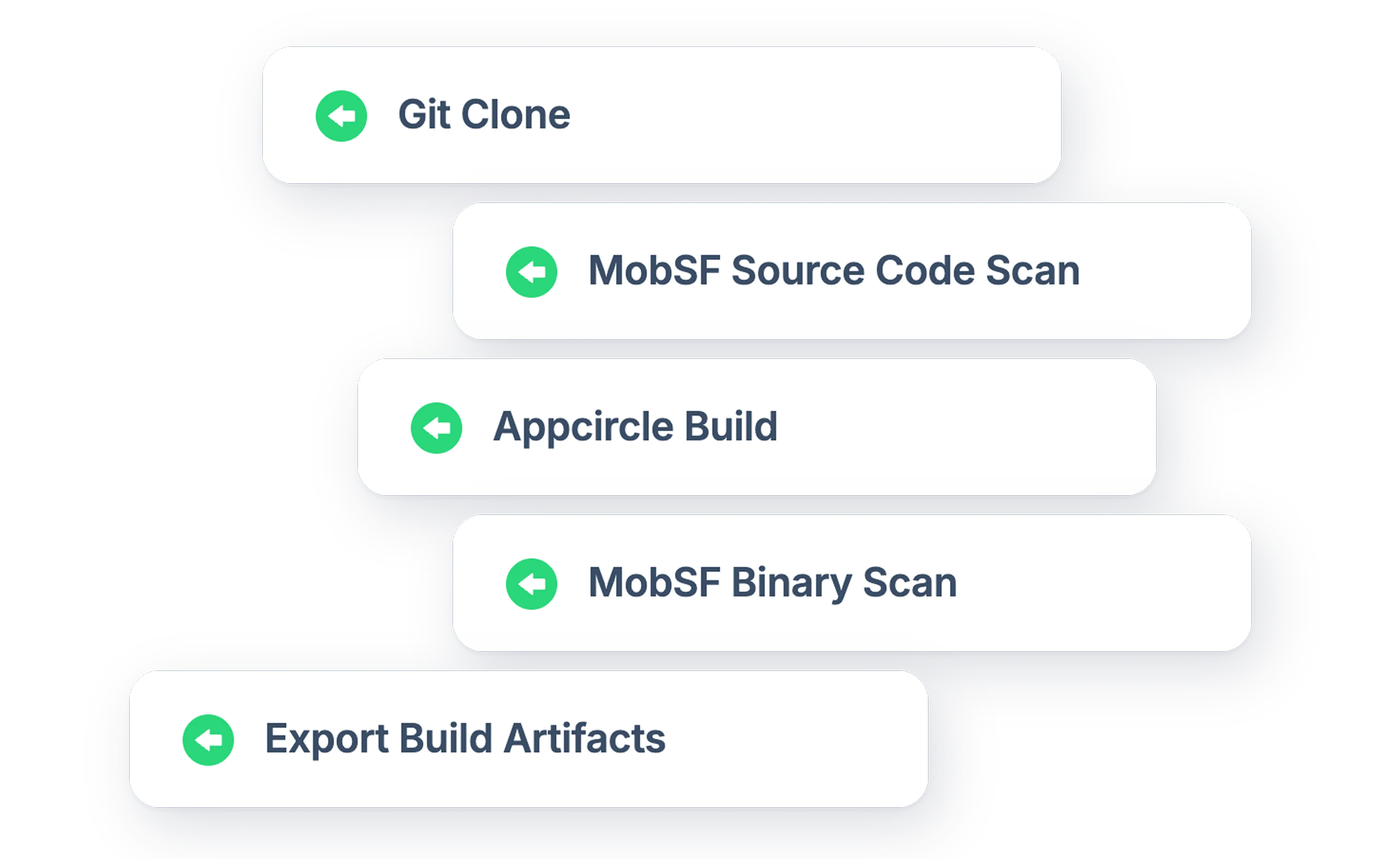
A typical setup places them at the two points where each is most useful. MobSF Source Code Scan runs early, after the repository is checked out and before the build starts, so developers get code-level findings on every commit or pull request. MobSF Binary Scan runs after the build produces a signed APK, AAB, or IPA, so the artifact that will actually be distributed is the one inspected. Both publish their reports alongside the build output, downloadable from the build detail page even when the scan is the reason the build failed.
Appcircle runs the same way on its own cloud and inside your organization. With Self-Hosted Appcircle, the build agents, the MobSF installation, and the reports all sit within your own network, so an unreleased app is never analyzed on infrastructure you do not control. Regulated environments get the same two steps, the same gates, and the same reports as everyone else, which is usually what makes automated scanning approvable in the first place.
Everything else is set in the interface: which severities are worth failing a build over, what minimum security score to require, and which rules are intentional in your codebase and should be excluded. Configuration details for both steps live in the MobSF Source Code Scan and MobSF Binary Scan documentation.


Benefits of Automated Security Scanning in Mobile CI/CD
With both steps in place, the practical effects show up across engineering, security, and audit:
- Security becomes a build outcome, not a milestone. Every build produces a security result the same way it produces a binary. No separate scheduling, no request queue, and no release where the scan was skipped because the date was tight.
- Findings arrive when they are cheapest to fix. A hardcoded secret caught in a pull request is a five-minute change. The same secret caught after distribution is a credential rotation, a forced app update, and an incident report.
- Every release is measured against the same bar. Manual reviews vary by reviewer and by workload. An automated scan applies identical rules to every build, on every branch, for every product in the portfolio, which is what makes a security standard enforceable rather than aspirational.
- Risky builds stop automatically. Both steps can break the pipeline when a finding crosses a severity level you define or when the security score falls below a threshold you set. A policy becomes a mechanism instead of a document.
- Audit evidence is produced as a by-product. Reports are written out before the build is graded and published as build artifacts, so the findings that broke a pipeline stay downloadable. When an audit asks how you verify released versions, the per-build record already exists.
- Third-party risk becomes visible. Modern mobile apps are mostly other people's code. Binary analysis surfaces the permissions, trackers, and behaviors your dependencies bring with them, the part of your attack surface that no review of your own repository will reveal.
- One pipeline covers the whole portfolio. The same steps work across native iOS and Android, React Native, and Flutter projects. One security standard, not one per technology stack.
- Nothing has to leave your network. With Self-Hosted Appcircle, source code, binaries, and scan results all stay inside your own infrastructure, which is often the specific requirement that determines whether automated scanning happens at all in regulated industries such as financial services, healthcare, the public sector, and defense.
- It fits a layered approach. MobSF sits alongside the other security steps available in Appcircle workflows: Snyk Security Scan for dependency vulnerabilities, SonarQube for code quality, and Appdome Build-2Secure for app shielding on iOS and Android. Static analysis is a strong first line, not a complete program.
Setting the Gate at the Right Level
A gate is the rule that decides whether a build with security findings is allowed to continue. Both MobSF steps can report findings without affecting the build or fail it when a finding crosses a severity you choose or the security score falls below a minimum you set. Where you set that line matters more than it sounds: a gate that is too loose gets ignored, and one that is too strict gets worked around.
- Start in reporting mode. Run both scans for a few weeks without failing anything and look at what comes back. Most teams find a backlog on the first run. That number is your real baseline, not a target to clear before the gate can be switched on.
- Then tighten in steps. Break the build on critical findings first, work the backlog down, and raise the threshold as the count drops. Each step is a small, negotiable change rather than a policy the team has to absorb all at once.
- Handle the intentional findings properly. Some flagged patterns will be deliberate in your app. Exclude those specific rules through configuration kept in your repository, so the exception goes through code review and stays visible to whoever looks next. Loosening the gate for everyone to silence one finding does the opposite.
For more on securing the pipeline itself rather than the app it builds, see Mobile CI/CD Security: Top 5 Best Practices.
Conclusion
Mobile apps carry more organizational risk than almost anything else a company distributes, and they receive the least ongoing review. The gap is rarely a lack of intent. Security review has traditionally been manual, late, and expensive, competing with the release date and losing.
Automating it removes the competition. With MobSF running as part of your Appcircle workflows, every build is checked against the same standard, findings surface where they are cheap to fix, and the evidence trail builds itself. For enterprise mobile teams, that is the difference between a security posture you assert and one you can demonstrate.
Frequently Asked Questions
1. What is MobSF used for?
MobSF is an open-source security framework for mobile applications. It performs static analysis on both mobile source code and compiled apps, reporting issues such as hardcoded secrets, weak cryptography, over-broad permissions, missing binary protections, and embedded trackers, with findings mapped to CWE and OWASP MASVS references.
2. Do I need both the source code scan and the binary scan?
They cover different ground. The source code scan finds issues in code your team wrote and points at the exact file and line, early enough to fix before the build. The binary scan examines the app that actually gets released, including everything third-party SDKs contribute. Running both gives complete coverage; running one leaves a known gap.
3. Is MobSF a SAST tool?
Yes. MobSF is a static analysis tool built specifically for mobile. Its binary analysis also reveals some of what SCA and DAST would surface, such as the permissions and trackers third-party SDKs bring in, but it does not replace either: dependency scanning and runtime testing still cover ground static analysis cannot.
4. Will security scanning slow down our releases?
Scanning adds time to a build, not to a release cycle. In practice it removes far more delay than it adds, because the alternative is discovering the same findings after the release candidate is frozen, when fixing them means a new build, a new test pass, and a moved date.
5. Does MobSF replace penetration testing?
No. Static analysis covers a broad set of known issues consistently and on every build, which is where automation excels. Penetration testing covers business logic flaws, runtime behavior, and creative attack paths that static tools cannot reason about. Automated scanning keeps the routine findings out of the pen test report so testers spend their time on what only humans can find.
6. Does our source code or app leave our environment?
No. Both scans run as steps inside your own Appcircle pipeline, where the build already happens, so nothing is uploaded to an external scanning service for analysis. Teams with stricter requirements can go a step further with a self-hosted deployment, which keeps the build infrastructure itself inside your own network as well.
7. How do we prevent a failing scan from blocking every build?
Set the gate to match where your codebase is today rather than where you want it to be. Start by reporting findings without breaking builds, then fail only on the highest severities, then tighten as the backlog is worked down. Both steps let you choose the severity level and score threshold that break the pipeline.