





Flutter is an open-source mobile application framework created by Google that allows you to build natively compiled apps for mobile, web, and desktop using a single codebase.
To deploy your Flutter web application, you can use Firebase Hosting. It is a web hosting service for both static and dynamic content, offering fast and secure delivery of HTML, CSS, JavaScript, and media files.
In this blog post, we will walk you through how to deploy your Flutter web app to Firebase using Appcircle, without needing to run any manual commands. If you’re also looking to simplify publishing to app stores, see how Appcircle simplifies the process.
What is a Flutter Web App and Why Host It on Firebase?
A Flutter Web App is like having a supercharged website that looks and behaves like a regular mobile or desktop app.
According to the Flutter documentation:
Flutter delivers the same experiences on the web as on mobile.Building on the portability of Dart, the power of the web platform, the flexibility of the Flutter framework, and the performance of WebAssembly, you can build apps for iOS, Android, and the browser from the same codebase. The web is just another device target for your app.
Firebase Hosting for Flutter Web Apps: Explained
Think of it as a home for your web app. If you build a Flutter Web App, you need a place to store it online so people can access it. Firebase Hosting does just that—it takes your app and makes it accessible to the world through the internet.
According to the Firebase documentation:
Firebase Hosting provides fast and secure hosting for your web app.Firebase Hosting is production-grade web content hosting for developers. With a single command, you can quickly deploy web apps to a global CDN (content delivery network). Though Firebase Hosting is optimized for static and single-page web apps, you can also pair Firebase Hosting withCloud Functions or Cloud Run to build and host dynamic content and microservices on Firebase.
Why Use Them Together?
Hosting Flutter web apps on Firebase is especially effective for fast, static deployments. Using Flutter Web and Firebase Hosting together can be a powerful combination. Here is why:
- Speed and Efficiency: Flutter lets you build your app quickly, and Firebase Hosting ensures it is online and fast for your users.
- Cross-Platform Power: With Flutter, you can create one app that works on mobile, desktop, and the web. Firebase Hosting ensures the web version of your app is accessible everywhere.
- Cost-Effective: Both tools are developer-friendly and can be very affordable, making them great for startups or personal projects.
- Scalability: Whether you have 10 users or 10,000 users, Firebase Hosting can handle the traffic without breaking a sweat.
How to Deploy Flutter Web App on Firebase Hosting with Appcircle
Appcircle offers three pre-configured steps to simplify your deployment process. For technical details about these steps, you can click on the links below:
- Flutter Install: The Flutter Install step is a prerequisite for the Flutter Build for Web step. It installs the Flutter SDK to enable the use of Flutter CLI in the following steps.
- Flutter Build for Web: The Flutter Build for Web step builds your web application using the Flutter SDK.
- Firebase Deployment: Firebase Deployment step allows you to deploy web applications to Firebase effortlessly using Appcircle.
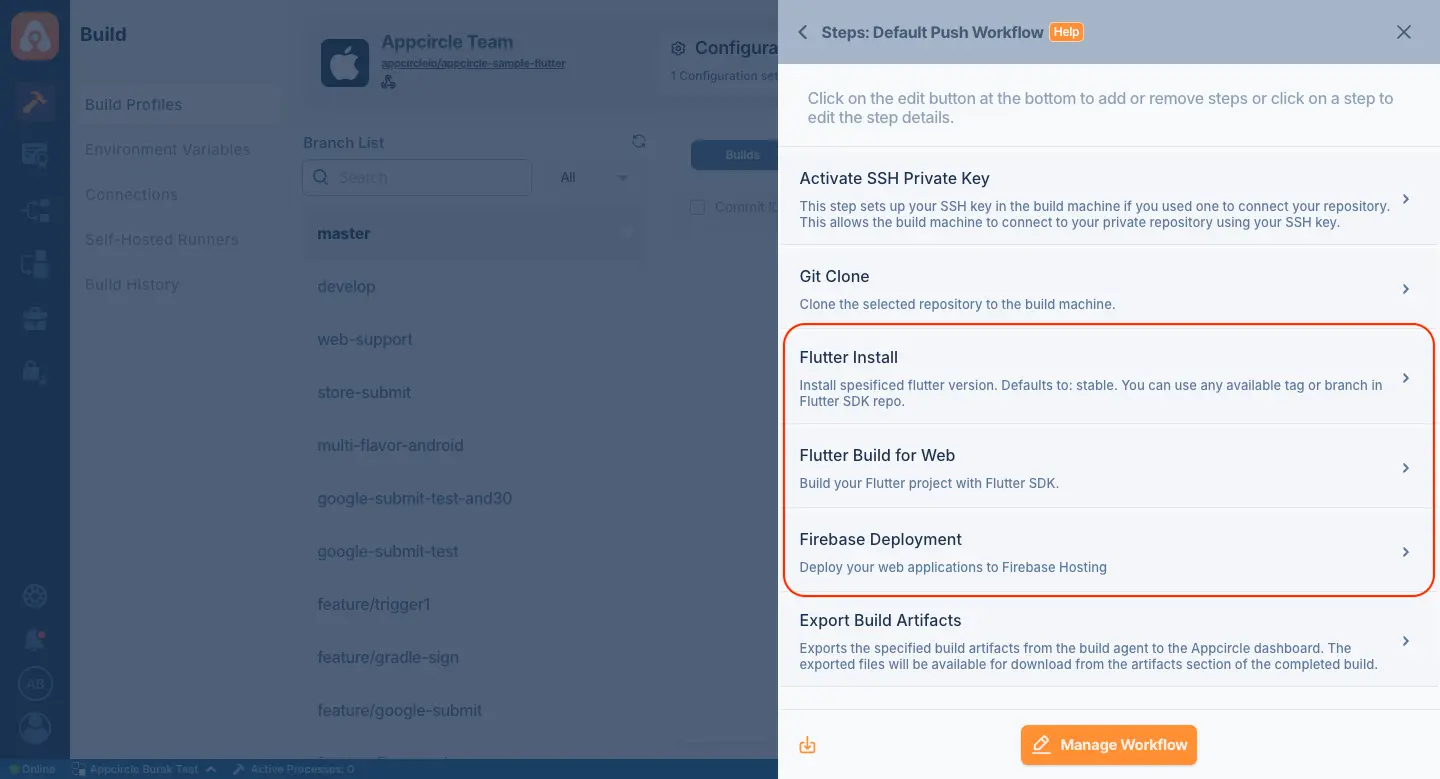
By adding these three steps to your workflow, you can easily automate deployment of your Flutter web app to Firebase using Appcircle.
Conclusion
Deploying a Flutter web app to Firebase is effortless with Appcircle’s pre-configured workflow steps. By automating the build and deployment process, Appcircle saves time and ensures efficiency—no commands required. Whether you’re a startup or an independent developer, this integration lets you focus on creating great web experiences.