

iOS App Releases
Complete guide to iOS app releases covering App Store submission workflow, Apple App Review process, metadata management, release strategies, and mobile release management best practices.
Introduction to iOS App Releases
After you thoroughly test your app, the next and final step is releasing your application on the App Store. This means your app will be listed among the apps on the App Store and will be available for download to millions of iOS users worldwide. When your app is released on the App Store, it becomes accessible to end users and represents the final destination of the current development cycle until the next release.
Publishing an iOS app follows a structured iOS App Store submission workflow: packaging your binary, uploading it through Xcode or your CI/CD system, configuring your App Store listing, and submitting the build for Apple App Review. Once the submission is approved, your app becomes publicly available on the App Store where users can download and install it on their devices.
As with every stage of the iOS mobile app development lifecycle, Apple enforces strict rules and guidelines for publishing an app on the App Store. This guide also explains the complete App Store Release Workflow for iOS App Releases, including automation best practices.
What is Mobile App Release?
Mobile app release is a more generic term that can be used for all mobile application platform types such as iOS or Android. A mobile release refers to the process of delivering a fully tested and production-ready mobile application to real users. A mobile release is the point where development, testing, and compliance checks come together to make the app available to the public. It also marks the beginning of the next development cycle, since each new update will follow the same release workflow.
In the context of iOS, this involves preparing your build, uploading it to App Store Connect, submitting it for Apple App Review, and publishing it on the App Store once it is approved. All of these stages form the foundation of your iOS release pipeline.
App Store Release Workflow
This workflow is also commonly referred to as the App Store publish pipeline or iOS App Store submission workflow. A structured workflow for App Store release is essential for managing how you publish your application on the App Store. The entire process is managed through App Store Connect (appstoreconnect.apple.com), where you upload builds, configure your app listing, submit the app for Apple App Review, and plan your release strategy.
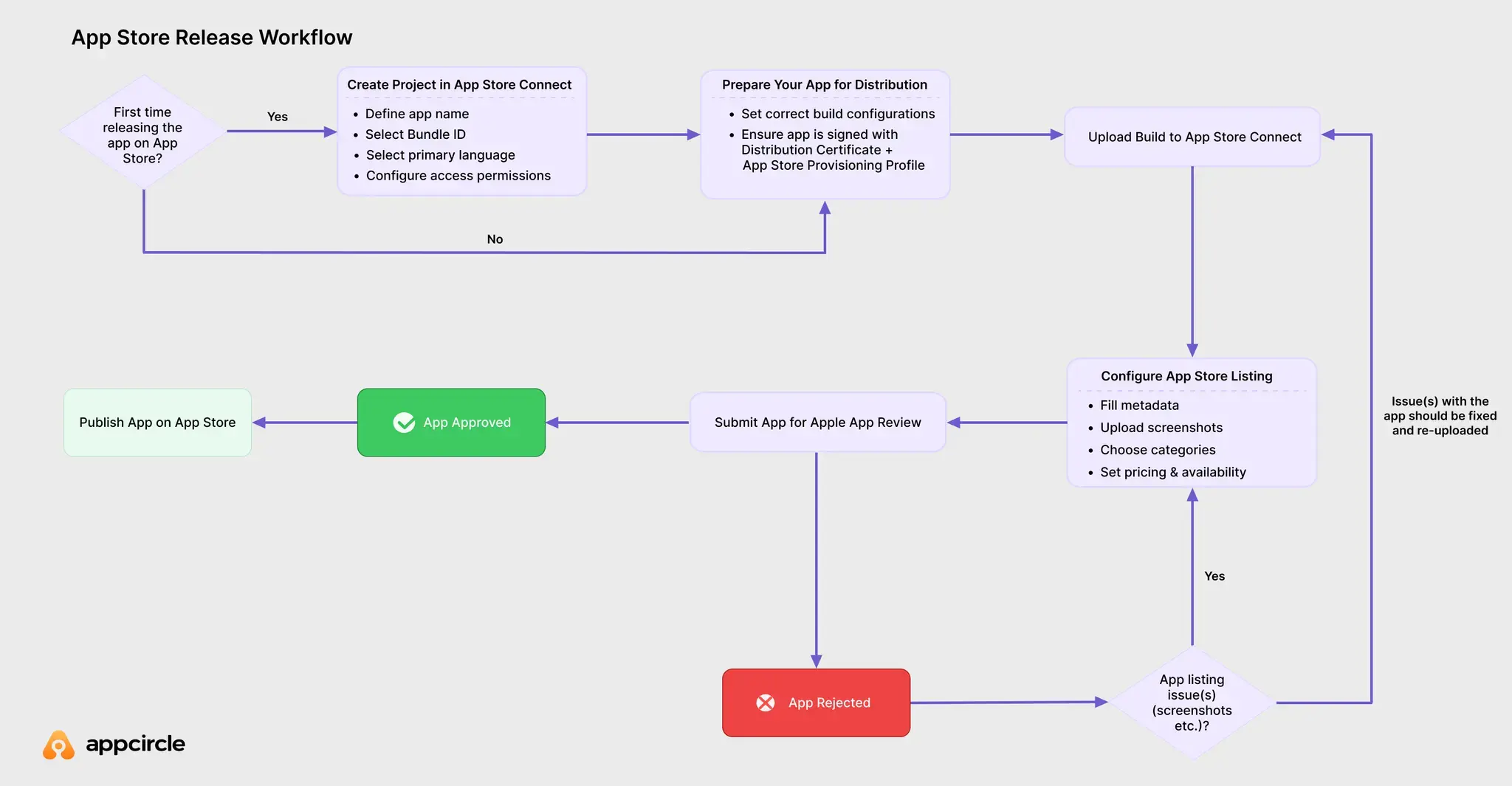
At a high level, the App Store release workflow includes the following stages:
- Create your project in App Store Connect
If your app does not already exist in App Store Connect, you must create the app project first. This includes defining the app name, bundle ID, primary language, and access permissions (full access or limited access). These initial configurations create the project container where all future version releases of the application will be managed.
- Prepare your app for distribution
This includes creating the correct build configuration, ensuring proper app signing, archiving the app in Xcode, or generating a signed build through your CI/CD system.
- Upload your build to App Store Connect
You can upload your binary directly from Xcode or automate the upload through a CI/CD platform.
- Configure your App Store listing
This involves filling in all required metadata, uploading screenshots, selecting categories, setting pricing and availability, and completing any necessary compliance forms.
- Submit your app for Apple App Review
Every iOS app must be reviewed to ensure it meets the App Store Review Guidelines. Apple checks functionality, performance, content, privacy practices, and overall compliance.
- Publish your app on the App Store
After approval, you can publish the app immediately, schedule a release date, or use a phased rollout for a gradual and controlled deployment.
Preparing Your App for App Store Submission
Before uploading your build to App Store Connect for app review, first the build or binary should be prepared for App Store Submission:
- Set correct build configuration
There is no single way of building an iOS application. The build configuration depends on what you plan to do with the generated artifact (.ipa). For example, for testing you need to build your app using Debug configuration and enable the appropriate debugging or testing capabilities. For release, you need to use the Release build configuration and make sure that all required assets and capabilities are included.
Quick tip: To learn how to build your iOS application for different purposes such as testing, distribution or release, check out this iOS build guide.
- Make sure the version and build number are incremented
Each submission to App Store Connect requires a higher build number than the previous upload. If a new version is uploaded with the same build number, than your application will be rejected by Apple. Ensure both the version and build numbers follow iOS version numbering best practices to avoid rejected reviews.
Quick tip: To learn managing iOS app versioning and real-life use cases check out iOS App Versioning guide.
- Sign your app for release
If you use manual signing, select an App Store provisioning profile and the correct distribution certificate.
If you use automatic signing, make sure the correct Apple Distribution certificate is selected on Xcode or CI/CD platform.
Quick tip: To learn how to properly sign your iOS application to avoid App Store submission issues or rejections, check out this iOS Code Signing guide.
- Re-sign if needed
If the binary or artifact (
.ipa) is already generated but needs to be re-signed, either to change ownership or to update the distribution type, make sure it is re-signed with the correct distribution credentials before uploading.
How to Submit an iOS App to App Store Connect
Submitting an iOS app to App Store Connect requires several preparation steps before the build is ready for public release on the App Store. Once your build is packaged, signed, and tested, you can upload it to App Store Connect for configuration and review.
Packaging & Uploading Your Build with Xcode or CI/CD
Packaging your build refers to generating the artifact (the .ipa file) that is ready for submission, as described in the previous section. After the .ipa is prepared, there are two primary ways to upload a version to App Store Connect:
- Xcode: Xcode is Apple's official development environment for building iOS applications. It also provides a built-in upload flow that allows you to archive your project and send the binary directly to App Store Connect. This method is commonly used for manual submissions or smaller teams.
- CI/CD or release automation tools: CI/CD and release automation platforms use Apple's API endpoints to upload builds to App Store Connect automatically. This method removes the need to manually archive, or upload builds through Xcode. It is ideal for teams that want consistent, automated, and repeatable releases as part of their development workflow.
Managing Metadata, Screenshots, Pricing, and Availability
After your build is uploaded to App Store Connect, the next step is to prepare your App Store product page or app listing. At this stage of the App Store release process, Apple requires a complete and accurate set of metadata before your app can be submitted for review. This information helps users understand your application and also ensures the App Store listing complies with Apple's content and policy requirements.

- Metadata information: This includes the app name, subtitle, description, keywords, support URL, marketing URL, and the required privacy information. High-quality and accurate metadata improves discoverability and helps set expectations for users.
- Screenshots and app previews: Visual assets must reflect the actual user experience and follow Apple's size and format requirements. You must provide screenshots for each supported device size, such as iPhone, iPad, and any other platforms your app targets.
- Categories and age rating: You will need to select the primary and secondary categories that best describe your app. App Store Connect also guides you through a questionnaire that determines the correct age rating based on your app content.
- Pricing and availability: You can set your app to be free or paid, choose specific pricing tiers, and define which regions or countries will have access. This section also lets you configure availability settings for pre-orders or limited release regions.
Submitting Your Build for Review
Once all required fields are completed and your App Store listing is fully prepared, your app becomes eligible for submission to Apple App Review. You can submit it manually or integrate it into an automated App Store publish pipeline using CI/CD tools like Appcircle.
Apple App Review Process
Every application intended for distribution on the App Store must go through the Apple App Review process. All apps, app updates, app bundles, in-app purchases, and in-app events submitted via App Store Connect are reviewed by Apple before becoming available to millions of users. This process helps ensure a safe, trusted user experience and provides developers with a fair opportunity to deliver high-quality applications.
iOS App Store Review Guidelines
Apple provides detailed App Review Guidelines that outline the requirements across five key areas: Safety, Performance, Business, Design, and Legal.
In addition to these review guidelines, Apple also evaluates apps against the Human Interface Guidelines. These guidelines define Apple's best practices for layout, navigation, system components, accessibility, and overall user experience. During App Review, apps that do not follow recommended interaction patterns, misuse system UI elements, or provide a confusing or inconsistent user experience may be rejected under design-related review criteria.
| Section | Evaluation Categories |
|---|---|
| Safety | • Objectionable Content • User-Generated Content • Kids Category • Physical Harm • Developer Information • Data Security • Reporting Criminal Activity |
| Performance | • App Completeness • Beta Testing • Accurate Metadata • Hardware Compatibility • Software Requirements |
| Business | • Payments • Other Business Model Issues |
| Design | • Copycats • Minimum Functionality • Spam • Extensions • Apple Sites and Services • Mini apps, mini games, streaming games, chatbots, plug-ins, and game emulators • Login Services • Apple Pay • Monetizing Built-In Capabilities |
| Legal | • Privacy • Intellectual Property • Gaming, Gambling, and Lotteries • VPN Apps • Mobile Device Management • Developer Code of Conduct |
Before submitting your application for review, consider these essential points:
- Test your app thoroughly for crashes and bugs.
- Ensure all app information and metadata are complete and accurate.
- Update your contact information so App Review can reach you if needed.
- Provide App Review with full access to your app.
- If your app has account-based features, provide an active demo account or a fully featured demo mode.
- Provide any additional hardware or resources required for review (e.g., login credentials, sample QR codes).
- Ensure all backend services are enabled, live, and accessible during review.
- Add detailed explanations in the App Review notes for any non-obvious features or in-app purchases, including documentation if needed.
- Confirm that your app follows relevant Apple documentation and guidelines, such as: SwiftUI, UIKit, Guidelines for Using Apple Trademarks and Copyrights.
These are the primary areas Apple recommends reviewing before submitting your iOS app. However, developers should always consult and follow Apple's official App Review Guidelines to ensure full compliance.
iOS App Store Review Time
According to Apple, 90% of app submissions are reviewed within 24 hours. However, review times may increase if the submission is incomplete, contains missing information, or requires additional clarification.

Review durations can also be affected during holiday periods. When processing times are expected to slow down, Apple publishes an official announcement so developers can plan their release schedules accordingly.
Tracking Review Status on App Store Connect
When the status of your app submission changes, Apple will notify you by email. You can also monitor the review status at any time from the Apps section in App Store Connect or through the App Store Connect app on iPhone and iPad. Tracking review status is a key part of any App Store release workflow, especially for teams operating on a scheduled release plan.
For a more streamlined approach, you can track your application's review progress using Appcircle. Appcircle allows you to add a "Check App Store Release Status" step to your App Store publishing workflow. This step periodically checks the status of your iOS app and provides updates such as Waiting for Review, In Review, or Ready for Sale, ensuring you always have real-time visibility into your release status.
Managing App Store Review Rejections
There is always a possibility that your app may be rejected during the App Review process. When this happens, developers must thoroughly review the rejection details, understand the underlying issues, make the necessary fixes, and resubmit the app with an incremented build number.
Common App Store Review Rejection Reasons
- Crashes and bugs: Ensure your application is thoroughly tested and stable.
- Broken links: All links within the app must be functional and accessible.
- Placeholder content: Remove all placeholder text or images and finalize your content before submission.
- Inaccurate screenshots: Screenshots must accurately represent the current state and functionality of the app.
- Incomplete App Review information: Provide complete, clear, and accurate information to help reviewers understand your app.
- Privacy policy issues: Ensure your privacy policy is accessible, accurate, and aligned with Apple's requirements.
For more detailed explanations and solutions, check out the Top App Store Rejections and Solutions post.
How to Resolve App Review Guideline Violations
When your application is rejected, the first step is to carefully review the rejection reason provided by Apple. Each rejection corresponds to a specific guideline, and the required fix depends on the nature of the issue. Developers must address the problem, verify compliance with the relevant guidelines, and then resubmit the app with an updated build number if necessary.
Below are some common real-world rejection scenarios and how to resolve them:
- Rejection Reason: Inaccurate or misleading screenshots
Resolution: Update the incorrect screenshots in App Store Connect to ensure they accurately reflect the app's current UI and functionality. - Rejection Reason: Crashes detected during review
Resolution: Reproduce the crash using the logs provided, fix the underlying bug, thoroughly retest the app, and resubmit a new build. - Rejection Reason: Missing or invalid demo account credentials
Resolution: Provide a working demo account with full access to all required features, and include updated login details in the App Review notes. - Rejection Reason: Broken links or non-functional buttons
Resolution: Fix or replace broken links, ensure all in-app navigation works correctly, and confirm that backend endpoints are live during review. - Rejection Reason: Incomplete metadata or insufficient explanation of features
Resolution: Update the app's metadata, description, and App Review notes to give clear, detailed explanations of how key features work. - Rejection Reason: Privacy guideline violations (e.g., missing privacy policy)
Resolution: Add a compliant privacy policy URL, update in-app disclosures, and ensure that all data collection practices align with Apple's privacy guidelines. - Rejection Reason: Improper use of Apple trademarks or icons
Resolution: Remove or correct any trademark-infringing content and follow Apple's official branding and trademark usage rules.
There are no limitations on how many times you can resubmit your app for review, and there is also no limit to how many times it can be rejected. Apple will reject an app as soon as they discover a single issue. This means that a rejection notice may list only one problem, and after you fix and resubmit the app, it may be rejected again for a different reason.
This is why it is considered best practice to thoroughly review the App Store Review Guidelines before submitting your iOS app.
Releasing an iOS App on App Store
Once your application has been approved and has successfully passed the App Review process, it is ready to be released on the App Store. Developers can choose how and when the app becomes available to users by configuring release settings in App Store Connect. This stage is where you define your release strategy, manage timing, and optionally roll out the app gradually.
How to Publish iOS App to the App Store
After approval, your app will appear under the "Ready for Sale" or "Approved" status in App Store Connect.
During the App Information setup, there is an "App Store Version Release" section where Apple provides three release options:
- Manually release this version
- Automatically release this version
- Automatically release this version after App Review, no earlier than [specific date and time]
The correct option should be selected based on your team's release strategy.
Scheduled release vs manual release
Manual release:
If manually release this version is selected, the app will not go live automatically. Once the app is approved, a team member must release it manually:
- Navigate to App Store Connect → My Apps
- Select the approved app version
- Confirm the release to make the app publicly available
Quick tip: Keeping the final release step manual has trade-offs as teams and applications grow. To see where they show up, check out the 5 risks of manual app store publishing.
Scheduled release:
If automatically release this version is selected, the app will be published automatically once it is approved.
If you have chosen the "no earlier than" option with a specific date and time:
- The app will be released on that date if the review is complete by that time.
- If the review is completed after the specified date, the app will be released immediately upon approval.
This setup is useful for coordinated launches, timed marketing campaigns, or region-specific releases.
Using Phased Release and Rollout Options
Apple offers a phased release option that allows your app update to roll out gradually over a 7-day period. During this rollout, a randomly selected group of users with automatic updates enabled on eligible devices will receive the update each day. This approach helps reduce risk by limiting the impact of unexpected issues that may arise after release.
Phased Release Schedule:
| Day of Phased Release | Percentage of Users |
|---|---|
| 1 | 1% |
| 2 | 2% |
| 3 | 5% |
| 4 | 10% |
| 5 | 20% |
| 6 | 50% |
| 7 | 100% |
Benefits of Phased Release:
- Gradual rollout to users
- Ability to pause the release if critical issues appear
- Reduced impact from unforeseen bugs
Phased release is available only for app updates, not for first-time submissions. You may pause the phased rollout for up to 30 days, and there is no limit to how many times you can pause it. If you remove your app from sale during this period, the phased release will stop and cannot be re-enabled for that version.
Mobile Release Management
If you are an individual developer, managing mobile releases on your own is manageable, but for teams that include QA, product, and DevOps roles, handling mobile releases manually becomes increasingly difficult. Coordinating builds, approvals, metadata updates, screenshots, release timing, and cross-team communication can introduce delays and errors.
With proper mobile release management, teams can automate and streamline the entire App Store publishing workflow. This reduces release times from days to minutes, enables fully repeatable publishing pipelines, centralizes visibility into all store releases, and significantly minimizes human error. Many teams begin automating releases with tools such as Fastlane, but as workflows grow more complex, platforms offering end-to-end visibility and governance become increasingly valuable.
What is Mobile Release Management?
Mobile release management is the practice of planning, automating, coordinating, and tracking the release of mobile applications across app stores such as the Apple App Store and Google Play. It ensures every stage, from build creation to metadata updates to deployment, follows a controlled, consistent, and auditable workflow.
Effective mobile release management typically includes:
- Automated app builds and versioning
- QA approvals and multi-stage gating
- Metadata and screenshot management
- Automated publishing to App Store Connect
- Release scheduling and phased rollout management
- Centralized dashboards for visibility and reporting
Platforms such as Appcircle and Runway help teams automate these workflows so they can deliver releases faster and more reliably.
Quick tip: Selecting an app release management tool can be challenging. To compare Appcircle and Runway, check out this comparison page to choose the platform that best suits your needs.
Integrating CI/CD with App Store Connect
Integrating your CI/CD pipeline with App Store Connect allows you to automate the final steps of delivering your iOS application. Instead of uploading builds manually, updating the metadata, or adjusting release settings by hand, your CI/CD process can:
- Update metadata and get approval from QAs etc. before any submission
- Submit builds for TestFlight internal or external testing
- Check TestFlight status periodically
- Upload builds to App Store Connect automatically
- Track App Review status
- Release approved versions automatically or according to a schedule
Appcircle provides built-in publishing steps, such as Update Metadata on App Store Connect, App for Review on App Store, and Check App Store Release Status, which make it possible to create a complete end-to-end automated mobile release pipeline.
Building an Effective App Store Release Pipeline for iOS Apps
A release pipeline is the structured sequence of automated steps that takes an iOS application from source code to a fully published App Store release. For modern development teams, a well-designed App Store release pipeline eliminates manual work, enforces consistency, and ensures that every app version goes through the same reliable and auditable process.
- Customizable flow steps: Tailor the pipeline with optional steps for metadata updates, or compliance checks.
- Re-signing the build when needed: Automatically re-sign the .ipa with the correct distribution credentials before submission.
- Binary comparison with previous versions: Validate changes and prevent outdated or incorrect builds from being published.
- Approval gateways: Pause the workflow for QA, product, or legal sign-off before proceeding.
- Automated release strategies: Define whether the app should release manually, immediately, on a schedule, or using phased rollout.
- Rollback or halt mechanisms: Stop the pipeline automatically if issues are detected during testing or review stages.
Appcircle delivers a complete, automated App Store release pipeline that includes customizable workflows, re-signing, version checks, approval stages, automated release strategies, and rollback controls, allowing teams to optimize their iOS app release process from start to finish.
FAQs
How much does it cost to publish an app to the Apple Store?
Can I launch my iOS app for free?
What is a SKU in App Store Connect?
How do I submit an app to the Apple App Store?
Why is my app stuck in 'Waiting for Review'?
How can I speed up App Store Review?
Why did Apple reject my app?
My app is getting rejected multiple times. What should I do?
How long does it take to release an app to the App Store?
Can I schedule a release on the App Store?
What is phased release on the App Store?
Can I publish an iOS app without a Mac?
What should I check before submitting my app to the App Store?
Get Started with Appcircle
Save time, reduce costs, and increase developer productivity
Get informed about news, new releases, and mobile DevOps.