



Pull Requests (PRs) are a cornerstone of modern software development, playing a crucial role in ensuring collaborative contributions and maintaining code quality. However, the speed at which PRs are processed can significantly influence the pace of development and overall productivity. This guide explores practical strategies to optimize PR workflows, focusing on prioritization, communication, security, and leveraging tools like Appcircle to achieve faster, more efficient processes.
The Importance of Speed in Pull Request Processes
In software development, time is a precious resource. Efficient Pull Request workflows not only accelerate project timelines but also reduce the time developers spend waiting for feedback or approvals. When PRs are processed quickly, teams can identify and resolve conflicts faster, seamlessly integrate new features, and maintain a steady development pace. Beyond just saving time, a faster PR process contributes to better team morale and a more collaborative environment by minimizing delays and frustrations.
Prioritizing Steps in Pull Requests
A well-organized Pull Request workflow begins with deciding which tasks to address first. Poor prioritization can lead to wasted time, redundant efforts, or delayed results.
- Setting Priorities: Not all tasks in a PR workflow are created equal. Critical tasks such as fixing a breaking bug, addressing a security vulnerability, or unblocking a dependent feature should take precedence. By systematically evaluating the impact and urgency of tasks, teams can allocate their resources effectively and maintain a steady progression in the development cycle.
- Short Tasks First: When tasks have equal priority, focusing on shorter tasks first helps maintain workflow momentum. These quick wins create a sense of accomplishment and keep team members engaged while ensuring the pipeline remains free of minor bottlenecks.
Trigger Management in PR Workflows
Triggers are the foundation of automation in Pull Request processes, enabling tasks like tests, builds, and notifications to execute without manual intervention.
- Proper Setup: Configuring triggers accurately ensures consistent results and avoids delays caused by incorrect executions. A Pull Request or Merge Request trigger builds the merge result rather than the branch on its own, so reviewers see what the code will look like after the merge.
- Significance of Triggers: Reliable triggers automate repetitive workflows, such as starting tests after a commit, notifying reviewers, or reporting the build status back to the request. By automating these steps, teams can focus on higher-value tasks, accelerating the overall workflow.
- Scheduled Triggers: Beyond event-based triggers, Appcircle can also start builds at times you define, independent of any push or pull request activity. This suits nightly regression runs and deeper security scans that do not need to run on every PR.
- Avoiding Wasted Runs: A commit message containing
[skip ci]or[ci skip]skips the workflow, which keeps documentation and typo commits out of the queue. Auto Cancel Redundant Pipeline goes further and cancels an older queued or running build when a newer one matches the same configuration, workflow, trigger, and branch, so the queue holds the run people are actually waiting on. Manually started builds stay outside that mechanism.
A Fast-Feedback Pull Request Workflow
Once the trigger is in place, the order of the steps decides how quickly a developer hears back. The principle is simple: the checks that work from the project itself come first, and anything that needs a built application comes after them.
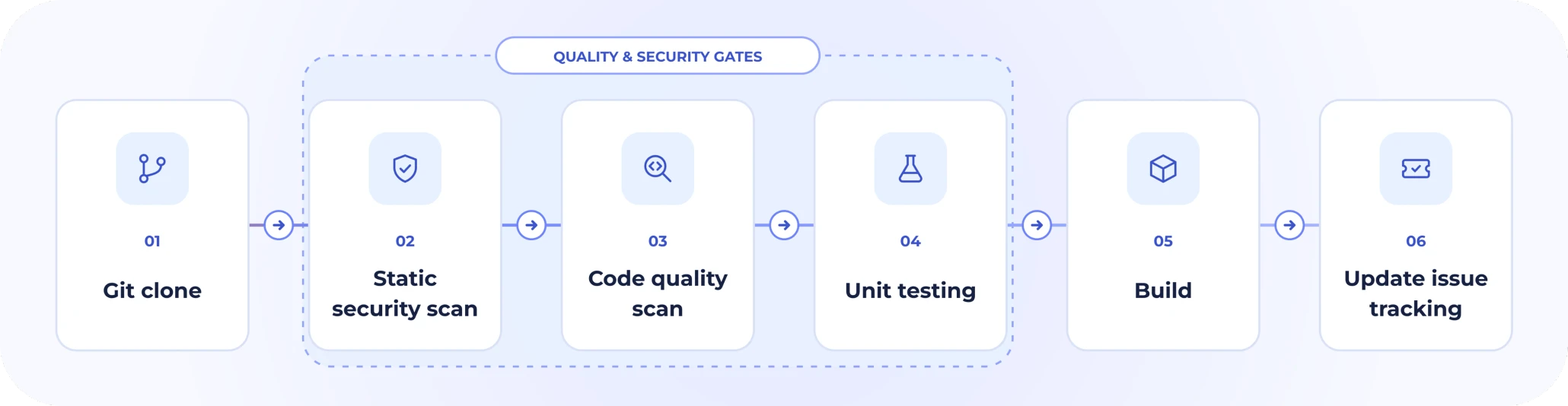
The order here is deliberate. The cheapest checks go first, so a hardcoded key or a missing test surfaces before the workflow has spent time compiling, and the developer hears about it while the change is still fresh in their head. How long each stage actually takes varies from project to project.
- Git clone. Everything that follows works from the checked out project. Projects that resolve dependencies in a step of their own slot that in here.
- Static security scan. Source code and dependency scanning, both of which read the repository and need nothing built yet.
- Code quality scan. Linting, style rules, and the static analysis that tracks quality across the project.
- Unit testing. The suite itself, plus a step that turns the raw output into a report a reviewer can read.
- Build. A change that does not compile is not worth reviewing, so the build belongs in the pull request even though nothing is distributed from it.
- Update issue tracking. The outcome posted onto the related issue, so the board reflects what happened without anyone updating it by hand. Set this one to run even when an earlier step has failed, otherwise a broken build is the one case the tracker never hears about.
Close the workflow with a step that exports the build artifacts, otherwise the scan and test reports stay inside the run rather than reaching the people who need to read them.
Which steps fill each stage depends on the platform. Our iOS code review guide and our Android code review guide walk through the actual workflow steps for each one, from linting and unit tests through to the security scans, and show how the same sequence extends into push and nightly builds. The rest of this article goes deeper on the security layers in this sequence, and on deciding which of them should be able to stop a request.
Managing Long-Running Steps in Pull Request Processes
Certain stages in a Pull Request workflow, such as running UI tests, unit tests, or security scans, can be time-intensive. Without proper management, these steps can slow the entire process. Adopting smart strategies ensures quality without compromising speed.
- Nightly Builds: For long-running tests, consider scheduling them when immediate feedback is not essential. Appcircle scheduled triggers run at fixed times regardless of repository activity, so a nightly regression run does not compete with PR feedback during the day.
- Non-Blocking Steps: Not every step needs to stop the pipeline when it fails. Workflow steps can be set to continue with the next step even if the step fails, which turns a slow or noisy check into an informational one while the rest of the workflow proceeds.
- Parallel Execution: Where your testing framework and build environment support it, run independent tests in parallel rather than one after another, and look through the workflow for dependencies that are forcing sequential processing without needing to.
- Reuse What Does Not Change: Every Appcircle build starts from a clean state, which means dependencies are fetched again on every run. The Cache Push and Cache Pull steps store those files at the end of one build and restore them at the start of the next, which can take noticeable time off runs where dependency installation is expensive. Both steps need to use the same cache label.
The same logic applies to security checks, which is where the balance between depth and turnaround matters most.
Layering Security into That Sequence
Speed is important in Pull Request workflows, but it should not come at the expense of security. Security checks are most effective when they are integrated directly into the development workflow, allowing teams to identify vulnerabilities while changes are still under review rather than discovering them later in the release process.
Not all of these belong in a pull request. The first group focuses on source-level checks that can run before the application is built, which makes them good candidates for early feedback on a request. Everything after it needs a built application, and in some cases a signed one, so it fits better on a push to the main branch or a nightly run than in the loop a developer is waiting on. The list runs roughly in that order.
Depending on the level of security validation required, teams can add different security layers to their PR workflows:
- Scan source code before building: MobSF Source Code Scan performs static application security testing (SAST) directly on Java, Kotlin, Android XML, Swift, and Objective-C source code. It can detect issues such as hardcoded secrets, weak cryptography, insecure random number generation, and unsafe WebView configurations, and each finding carries the file, the line, the severity, and CWE or OWASP MASVS references. Because the default scan only requires the repository to be cloned, it can run early in the workflow before the application is built.
- Identify vulnerable dependencies: Snyk Scan Security analyzes project dependencies for known vulnerabilities as part of an Appcircle build workflow. Since it runs after Git Clone, dependency checks can also be positioned early in PR validation to provide developers with faster security feedback.
- Add mobile security, privacy, and compliance checks: For Android projects, AppSweep Mobile Security Testing can analyze application code, configurations, and dependencies for security vulnerabilities, privacy risks, and compliance issues. It runs from the cloned repository against a selected build variant, so it can be placed after Git Clone as another check that works from the source side.
- Inspect the application that will actually be released: Source-level checks can be complemented with binary scanning after the application is built. MobSF Binary Scan analyzes APK, AAB, and IPA files and can inspect areas such as permissions, signing certificates, hardcoded secrets, binary protections, network security configuration, and trackers. This allows teams to validate the compiled artifact in addition to its source code.
- Connect specialized mobile security services: Appcircle workflows can also integrate with Data Theorem Mobile Secure and Fortify on Demand Mobile Assessment for additional mobile application vulnerability and security assessments. These integrations operate on the generated application artifact, making them suitable for post-build security validation within a PR workflow.
- Validate runtime security protections: KOBIL Appshield Scanner works with signed Android and iOS application files and performs dynamic runtime security testing on physical devices. It can also use static analysis for test cases that cannot be fully evaluated dynamically, providing another layer of validation for security measures implemented in the application.
- Apply application security protections: Appdome Build-2Secure can be integrated into Android and iOS workflows after the application is built. Rather than simply scanning for vulnerabilities, it automates the integration of security features, adaptive protections, code-signing, and certification processes into the mobile application.
Two things sit alongside that list rather than inside it. Credentials belong in an Environment Variable Group, with the sensitive ones stored as secrets so their values stay hidden during the build, rather than typed into a step. And the checks differ in how hard they push back: some support configurable failure conditions, such as a severity threshold or a minimum security score, while others simply report what they found. Any step can also be set to continue after a failure when it is meant to inform rather than gate. One distinction is worth keeping in mind here: a failed workflow and a blocked merge are not the same thing, and blocking the merge is a branch protection rule on the Git provider rather than something the scan does.
Teams in regulated industries have one more option underneath all of this. Appcircle can run self-hosted, which keeps source code, build artifacts, and scan results inside your own infrastructure while the workflow itself stays exactly as described here.
By combining Pull Request triggers with layered security checks, teams can move security feedback closer to the code change itself. This helps make security a continuous part of development rather than a separate stage at the end of the delivery process, while still allowing teams to choose the level of validation that fits each workflow.


Closing the Loop: Getting Results in Front of People
A check nobody sees changes nothing. The last part of a fast Pull Request workflow is making sure each result reaches the person waiting on it, in the place they are already working.
Report the build status to the repository. Enabling Set Commit Build Status in the build configuration sends each commit's build result to your Git provider, where it shows up as a check on the request itself. Reviewers can tell at a glance whether the build passed without opening another tab, and providers like GitHub and GitLab can be set to require that check before a request becomes mergeable.
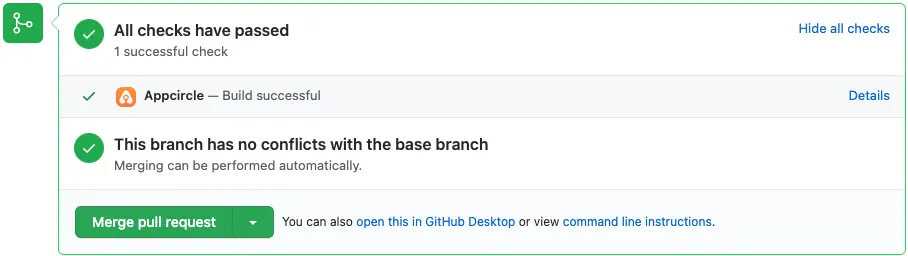
A passing Appcircle build reported back to the pull request, so reviewers see the result without leaving GitHub.
Let the workflow comment on the request. The Danger step applies your team's review rules to an open request and posts the result as a comment, so routine points like a missing test or an incomplete description come up before a person reads the diff. It works with GitHub, GitLab, and Bitbucket, and Azure DevOps teams can use the Azure Bot steps instead.
Tell the people who need to act. Slack, Microsoft Teams, and email keep requests from stalling simply because nobody noticed them:
- Alerting Team Members: Notifications ensure no PRs are forgotten or overlooked by providing timely reminders to the relevant parties.
- Prompt Reviews: Encourage reviewers to address their tasks quickly, reducing overall waiting times.
- Improved Decision-Making: With instant access to updates, decision-makers can act swiftly to resolve blockers or approve changes.
Get the build into a tester's hands. A binary can distribute automatically once the build finishes, sending it to the testing groups you choose. When a request needs someone to actually try it, that removes the step where a person downloads an artifact and forwards it.
Keep the issue tracker in sync. The Jira Comment and Azure Boards steps post the workflow result onto the related issue and can move its status, so the ticket reflects what happened without anyone updating it by hand.
Conclusion
Speed and efficiency are critical to achieving success in modern Pull Request workflows. By prioritizing tasks strategically, setting triggers up so they skip and cancel the work that no longer matters, layering security checks where they fit best, and reporting every result back to the request itself, teams can significantly enhance their development processes.
Incorporating CI/CD automation tools like Appcircle into your PR workflows ensures not just speed, but also reliability and scalability. These improvements lead to better collaboration, higher code quality, and an agile development environment. Take the first step towards optimizing your PR workflows today and unlock your team's full potential.
For iOS-specific review practices, see our guide to iOS code review practices. For the Android side, see our guide to Android code review practices.
Frequently Asked Questions
1. How do you streamline a pull request workflow?
A streamlined Pull Request workflow combines clear prioritization, automated builds and tests, timely notifications, and security checks. Automating repetitive validation steps helps developers receive feedback earlier while keeping manual reviews focused on the changes that require human judgment.
2. How should urgent pull requests be prioritized?
Prioritize by impact and urgency rather than by order of arrival. Breaking bugs, security fixes, and changes that unblock other work should be reviewed first, and when two requests carry the same priority, taking the shorter one first keeps the queue moving. Automated checks help here as well, since a request whose build has already failed does not need reviewer time yet.
3. What is the difference between source code scanning and binary scanning?
Source code scanning analyzes the code before the application is built, which makes it useful for catching issues early and pointing developers at the affected file and line. Binary scanning analyzes the generated APK, AAB, or IPA and shows what the released artifact actually contains, such as its permissions, signing certificate, and binary protections. Running both covers the code and the released app at different stages of the workflow.
4. Should every security scan block a pull request?
Not necessarily. Teams can decide which findings should stop the workflow based on their own policies and the severity of the issue. The MobSF steps apply a severity threshold and can also gate on a security score, and Snyk can be set to fail the build based on its results. Any workflow step can also be set to continue with the next step even if it fails, which turns a scan into an informational check rather than a gate.
5. How should long-running tests and security scans be handled in pull request workflows?
Pull Request workflows should lead with the checks that give developers useful feedback quickly. Source code analysis, dependency scanning, and unit tests can run early, while binary analysis, runtime testing, and more comprehensive assessments can run after the application is built or on a scheduled trigger when immediate feedback is not required. This keeps review turnaround short without giving up coverage.