



In the fast-moving world of software development, effective practices for iOS code reviews are just as important as hitting those tight deadlines. For iOS developers, adopting efficient pull request (PR) practices can significantly reduce errors, enhance collaboration, and accelerate deployment cycles. By leveraging automation tools integrated with Appcircle, teams can streamline their workflows, maintain high standards, and deliver faster.
The tools that support iOS code review and CI workflows can be grouped as follows:
- Code Analysis Tools
- Security Tools
- Testing Tools
- App Management Tools
- Issue Tracking Report Tools
1. Code Analysis Tools
Code analysis is the first line of defense in a pull request. These tools read the project without running it and catch the problems that are cheapest to fix while the author still has the change in their head.
SwiftLint
Code readability is one of the key parameters in development processes. Unused variables and lines exceeding character limits are among the most time-consuming issues during PR processes. SwiftLint enforces Swift coding style and conventions, helping maintain a consistent codebase. It detects both stylistic issues and potential programmatic errors early in development, ensuring adherence to team standards.
Example Use Cases:
- Detecting unused variables or force unwrapping in code.
- Enforcing custom team-specific style guides via .swiftlint.yml configurations.
- Breaking builds on severe violations to maintain code quality.
By identifying coding issues early, SwiftLint ensures higher-quality iOS code reviews and consistent standards.
For more information about SwiftLint, please visit the SwiftLint step documentation.
Danger
In development processes, it is essential to have specific PR rules to minimize complexity and time loss. With these rules in place, a significant amount of time can be saved during the review process by ensuring all requirements are met before proceeding. Danger automates code reviews by providing actionable feedback on PRs based on rules defined in a Dangerfile. It ensures that every PR meets the team's standards before merging, reducing manual effort and improving collaboration.
Example Use Cases:
- Ensuring PRs include descriptive titles and changelog entries.
- Flagging large PRs that exceed a specific line count.
- Highlighting files missing unit tests or documentation.
- Customizing feedback messages for team workflows.
Danger plays a key role in efficient iOS code review by automating feedback and enforcing best practices.
For more information about Danger, please visit the Danger step documentation.
Azure DevOps Bot for Swiftlint
Danger does not support Azure DevOps. Teams working there can use the Azure DevOps Bot for Swiftlint step instead, which serves the same purpose from the SwiftLint side: it analyzes your SwiftLint report, posts the details under the open pull request, and can change the pull request status. The step reads the report path that the SwiftLint step generates, so it belongs right after it, and it fails the build when the report contains warnings or errors.
Example Use Cases:
- Posting SwiftLint violations directly onto a pull request in Azure DevOps.
- Letting reviewers skip style discussion entirely and focus on the logic of the change.
- Changing the pull request status based on what the report contains.
For more information, please visit the Azure DevOps Bot for Swiftlint documentation.
SonarQube
For companies with multiple teams handling diverse tasks, code analysis is one of the most critical criteria. SonarQube allows you to analyze code quality with the SonarQube CLI, helping teams identify and track issues across the codebase. To bring iOS test results into that analysis, add Convert Xcresult to HTML/XML between the test step and SonarQube, since SonarQube reads XML rather than the .xcresult file Xcode produces.
Example Use Cases:
- Identifying code smells and error-prone patterns in Swift code.
- Enforcing code quality gates to block subpar code.
- Monitoring code complexity and maintainability metrics.
SonarQube's insights drive efficient iOS code reviews by ensuring maintainable codebases.
For more information about SonarQube, please visit the SonarQube step documentation.
2. Security Tools
A clean, well-structured Swift codebase can still hide a hardcoded API key, and a well-tested app can still trust any certificate handed to it. Security tools look for the things style and quality checks were never designed to catch. Where each one belongs in the pipeline comes down to what it reads: some work from the cloned project and cost a developer almost no waiting time, while others need a finished IPA and sit further down.
Static Security Tools
These read the project rather than the app, so they fit comfortably inside a pull request. The one exception below is MobSF Binary Scan, which needs the IPA and therefore waits for the build.
MobSF
Code quality and test coverage tell you whether an app works, but not whether it is safe to release. Security issues in iOS projects tend to surface late, often after the build has already been distributed, and by then the fix costs far more than it would have during review. MobSF brings that check into the pull request itself, and Appcircle offers it as two separate steps that answer two different questions.
MobSF Source Code Scan performs static application security testing on Swift and Objective-C source code. Its rules cluster around the patterns that cause most mobile security problems: leaked credentials, weak cryptography, network handling, injection and unsafe input, and storage and logging. Every finding points at a specific file and line, carries a severity, and maps to CWE or OWASP MASVS, so a reviewer can go straight to the code in question. Because the default scan works from the cloned repository, it runs before the application is built and gives developers feedback while they are still in the PR.
MobSF Binary Scan analyzes the generated IPA rather than the code behind it, and the questions it answers are different ones: which permissions the package requests, which certificate signed it, how its network security is configured, whether binary protections are in place, and whether secrets or trackers ended up in the app itself. Both steps can break the build at a chosen severity level, with critical as the default, or run as informational checks while a team is still tuning its thresholds.
Example Use Cases:
- Scanning Swift and Objective-C sources for hardcoded credentials on every pull request.
- Failing a build when a finding reaches a defined severity level or the security score drops below a threshold.
- Reviewing the permissions and signing certificate of an IPA before it goes to testers.
- Exporting scan reports alongside the build so reviewers can read the findings without rerunning the scan.
Bringing both source and binary analysis into the pipeline makes iOS code review cover not only how the code is written but also what is actually released.
For more information, please visit our documentation for MobSF Source Code Scan and MobSF Binary Scan.


Snyk Scan Security
Most of an iOS app is code the team did not write. Third-party libraries and frameworks arrive with their own histories, and a vulnerability disclosed upstream becomes the app's problem without a single line changing in the repository. Reviewing a pull request line by line will never surface that.
The Snyk Scan Security step runs the Snyk CLI against a project's dependencies and checks them against Snyk's vulnerability database. It runs after Git Clone, so it fits early in a PR workflow next to linting and static analysis. Findings can be limited to a chosen severity level, the build can be set to fail on the test result, and the dependency snapshot can be sent to Snyk for continuous monitoring so newly disclosed issues surface even between releases.
Example Use Cases:
- Checking third-party dependencies for known vulnerabilities on every pull request.
- Reporting only findings at or above a chosen severity level to keep the signal useful.
- Monitoring a project's dependency snapshot in Snyk to catch vulnerabilities disclosed after the merge.
Dependency scanning closes a gap that manual iOS code review cannot cover on its own.
For prerequisites, input variables, and reporting options, see the Snyk Scan Security step documentation.
Dynamic Security Tools
Dynamic testing means installing the app and watching what it actually does. That needs a signed IPA, so this usually runs after the merge rather than inside the review loop.
KOBIL Appshield Scanner
A jailbreak check that passes code review is not the same as a jailbreak check that survives a determined attempt to get around it. KOBIL Appshield Scanner settles that question by running the app rather than reading it. It takes a signed IPA, executes its tests on physical hardware instead of a simulator, and reports which protections are genuinely in place. Where a test case cannot be evaluated that way, it falls back to an AI-supported static inspection before reaching a verdict.
Example Use Cases:
- Confirming that anti-tampering or jailbreak detection behaves as intended on a real device rather than in a simulator.
- Running a final security verdict on the signed IPA before it goes out for distribution.
- Re-running the scan when a dependency or build configuration change could have weakened an existing protection.
For prerequisites, input variables, and the security verdict the scan returns, see the KOBIL Appshield Scanner step documentation.
Mobile Security Assessment Tools
Both of these are services rather than single scans, and both work on the generated application rather than the repository.
Fortify on Demand Mobile Assessment
Some teams need an assessment rather than a scan, with findings that hold up in front of a security team or an auditor. Fortify on Demand Mobile Assessment is an AppSec as a service offering, covering the tooling, training, AppSec management, and integrations that put security testing inside the delivery pipeline instead of beside it. In an Appcircle workflow it takes the path of the IPA as its input, so it belongs after the build rather than next to the source-level scans.
Example Use Cases:
- Detecting and resolving vulnerabilities in both the app's source code and its runtime environment before deployment.
- Categorizing findings by severity and risk level, and flagging the critical ones that must be fixed before release.
- Returning results to developers as part of the pipeline, rather than as a separate security exercise that happens weeks later.
- Running a full assessment on a release candidate while lighter scans continue to cover day-to-day pull requests.
For more information about Fortify on Demand Mobile Assessment, please visit the Fortify on Demand Mobile Assessment documentation.
Data Theorem Mobile Secure
Most scans answer a question once, at the moment they run. Data Theorem Mobile Secure is built to keep answering it: an automated, continuous service that looks for vulnerabilities and data privacy issues in the built app, and returns secure code recommendations rather than a list of findings somebody has to interpret first.
Example Use Cases:
- Scanning the built app for vulnerabilities before it is released to production.
- Checking that personal data is handled in line with the data protection requirements the team has to meet.
- Turning findings into secure code recommendations the team can act on rather than a list to triage.
For more information about Data Theorem Mobile Secure, please visit the Data Theorem Mobile Secure documentation.
Application Protection Tools
Everything above reports on the app. This one changes it, wrapping protections around the binary instead of telling you what is missing from it.
Appdome Build-2Secure for iOS
Appdome Build-2Secure takes a different route to the same destination. Rather than finding weaknesses for a developer to go and fix, it adds the defenses to the app directly: security features, adaptive protections, code-signing, and certification, all applied without manual coding or changes to the source.
Example Use Cases:
- Integrating protections such as anti-reverse engineering, anti-tampering, and encryption without changing the source code.
- Obfuscating code to make it harder to analyze the app's logic.
- Generating detailed security integration reports for audits or compliance checks.
For more information about Appdome Build-2Secure for iOS, please visit the Appdome Build-2Secure for iOS documentation.
3. Testing Tools
With quality and security covered, testing tools confirm that the code actually does what it is supposed to do. For iOS this means running the suite against the simulator or a device, turning the results into something a reviewer can read, and handing the build to a device farm when the change needs real hardware.
Xcodebuild for Unit and UI Testing
A completed PR undergoes detailed testing during the build phase through unit and UI tests. This allows any overlooked issues during the PR process to be easily identified, ensuring the release of a more stable version.
The Xcodebuild for Unit and UI Testing step in Appcircle automates testing for iOS apps using the xcodebuild command. It generates detailed .xcresult files, helping developers catch bugs and regressions early in the cycle.
Example Use Cases:
- Running tests for every PR to catch regressions.
- Testing specific OS versions to replicate production environments.
- Integrating test results into dashboards for visibility.
Robust testing workflows ensure comprehensive iOS code reviews by validating functionality and preventing regressions.
For more information about Xcodebuild Unit and UI Testing, please visit the Xcodebuild for Unit and UI Testing documentation.
Test Reports for iOS
An .xcresult file is not something a reviewer wants to open. The Test Reports for iOS step turns the output of the test run into a readable summary of results and coverage, and it supports Xcode 13+ XCTest, JUnit, Cobertura, and lcov.info. Its prerequisite is the Xcodebuild for Unit and UI Testing step, since that is what produces the file it reads.
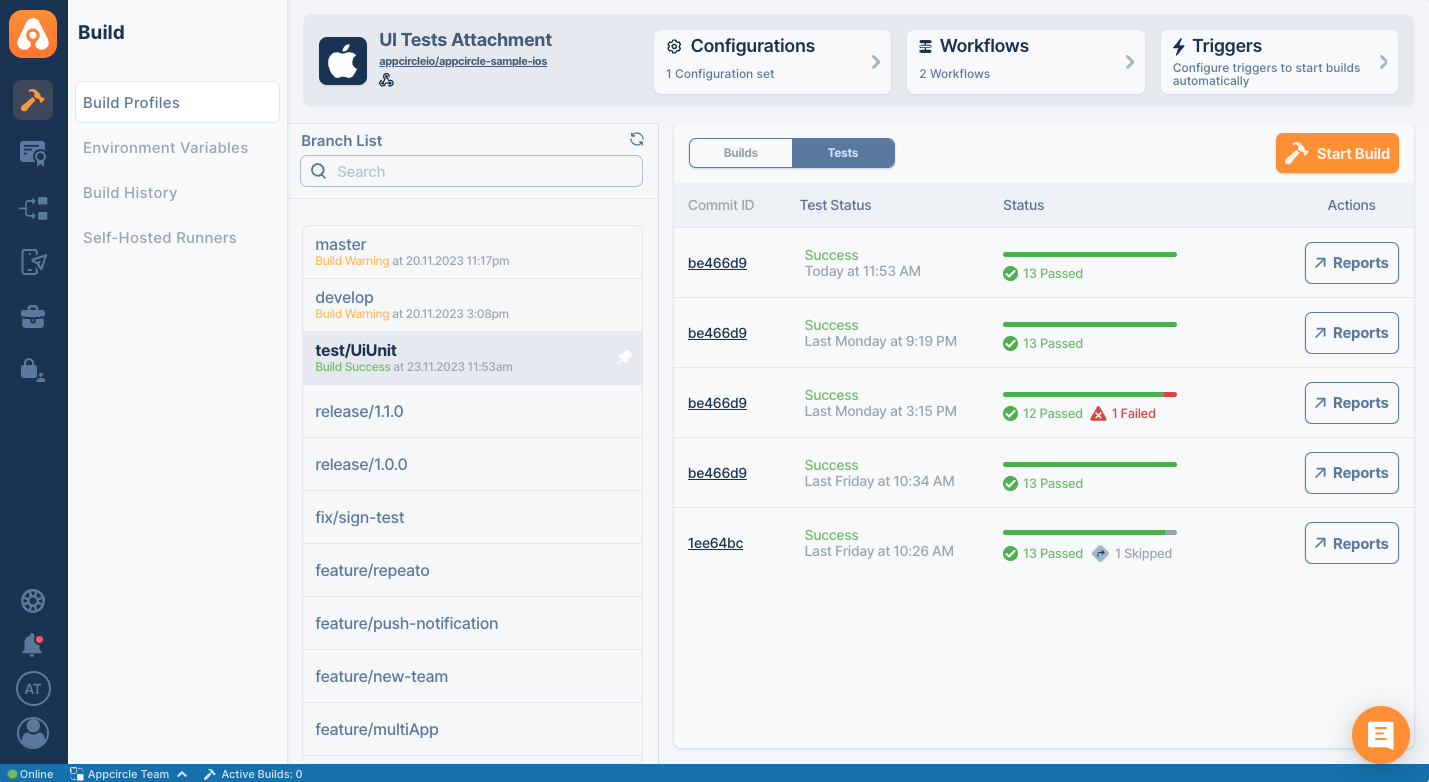
Example Use Cases:
- Sharing test summaries with the team.
- Highlighting failed tests for faster debugging.
- Generating user-friendly reports for audits.
Detailed test reports enhance iOS code review by making test results accessible and actionable.
For more information about Test Report for iOS, please visit the Test Reports for iOS documentation.
BrowserStack App Automate
Some problems only appear on real hardware. The BrowserStack App Automate step sends a test IPA to the BrowserStack dashboard and runs your XCUI suite there, so a change can be validated across devices and iOS versions without anyone maintaining a device lab. It works on the output of the Xcodebuild for Testing step, which builds the app together with its UI test runner.
Example Use Cases:
- Running an XCUI suite across several device and iOS version combinations.
- Reproducing a bug reported on a device the team does not have.
- Keeping device coverage consistent between releases.
For more information about BrowserStack App Automate, please visit the BrowserStack App Automate documentation.
Testinium
The Testinium step uploads your application to Testinium from an Appcircle workflow and runs a test plan there. For iOS projects its prerequisite is Xcodebuild for Devices, so it works on the IPA your build produced. Teams running several plans against the same app can use the Testinium Upload App and Testinium Run Test Plan steps instead.
Example Use Cases:
- Confirming that core features keep working after a change.
- Running the suite after every commit to keep the main branch clean.
- Testing on the devices that matter most to your audience.
For more information about Testinium, please visit the Testinium documentation.
4. App Management Tools
Analysis, security, and testing all look at what is inside the app. What is left is the app as an object: its version, its size, its icon, and the notes that go out alongside it.
iOS Increment Build and Version Number
In application release and testing processes, multiple packages can be released within the same day, each serving a different purpose. Therefore, version tracking is crucial. The iOS Increment Build and Version Number step in Appcircle automates this, giving each build its own build number and keeping the version number consistent across them. This prevents versioning conflicts and simplifies release management in CI/CD pipelines.
Example Use Cases:
- Incrementing the build number after each CI pipeline execution.
- Updating the version number automatically before a submission to the App Store.
- Maintaining consistency across environments (e.g., staging, production).
For more information about iOS Increment Build and Version Number, please visit the iOS Increment Build and Version Number documentation.
File Size Check
Binary size is one of the crucial parameters in PR processes. A developer on the team might unknowingly increase the binary size by integrating a third-party library that connects to other services. The File Size Check step compares the generated IPA against a maximum size you define, and either breaks the pipeline or raises a warning when that limit is exceeded.
Example Use Cases:
- Enforcing a size budget the app is not allowed to pass between releases.
- Preventing oversized builds from being distributed.
- Issuing a warning rather than breaking the pipeline, so the team can optimize assets before it becomes a release blocker.
For more information about File Size Check, please visit the File Size Check step documentation.
Add Badge to App Icon
After a PR is approved, the associated development or bug fix must be thoroughly tested. However, in large teams, testing and release processes can become highly complex. As a result, testers may occasionally get confused about which specific package they are testing.
The Add Badge to App Icon step in Appcircle visually differentiates app builds by overlaying badges on app icons. This is essential for distinguishing environments or build statuses at a glance.
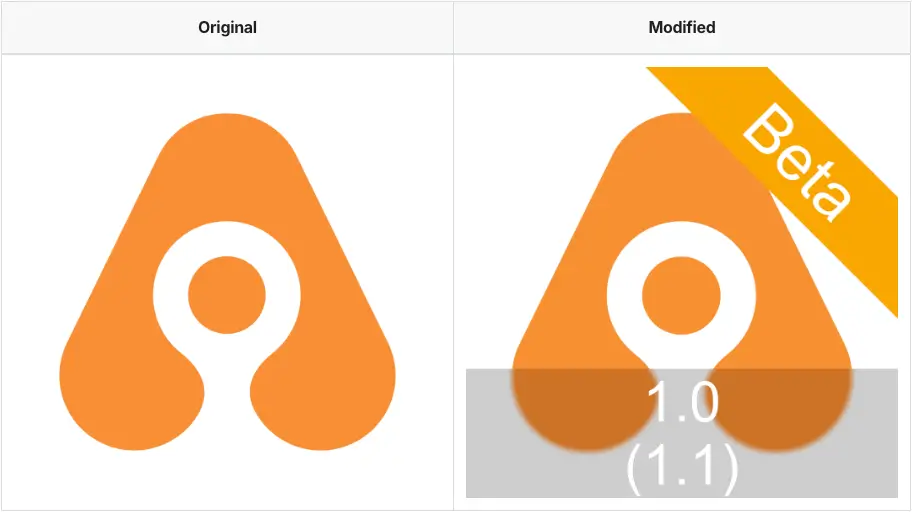
Example Use Cases:
- Adding "Beta" badges to staging environment builds.
- Customizing app icons for specific environments.
- Preventing accidental deployment of production apps during testing.
For more information about Add Badge to App Icon, please visit the Add Badge to App Icon documentation.
Publish Release Notes
The Publish Release Notes step automates the generation of release documentation by extracting commit messages or changelogs. It ensures consistency and accuracy across updates.
Example Use Cases:
- Generating release notes automatically from commit messages.
- Including notes in build artifacts for external sharing.
- Standardizing the format of release documentation.
For more information about Publish Release Note, please visit the Publish Release Notes step documentation.
5. Issue Tracking Report Tools
None of this helps much if the findings stay in a build log nobody opens. These steps push the outcome into the tracker the team already works in.
Jira Comment
The Jira Comment step integrates with workflows to automatically post updates to Jira issues. Its default template carries the commit id, branch name, time in UTC, and a couple of environment variables, and it can be edited to match what your team wants to see on a ticket.
Example Use Cases:
- Posting build status updates to the related Jira issue.
- Adding test results or distribution links to the issue as a comment.
- Moving the issue automatically when a success transition is configured.
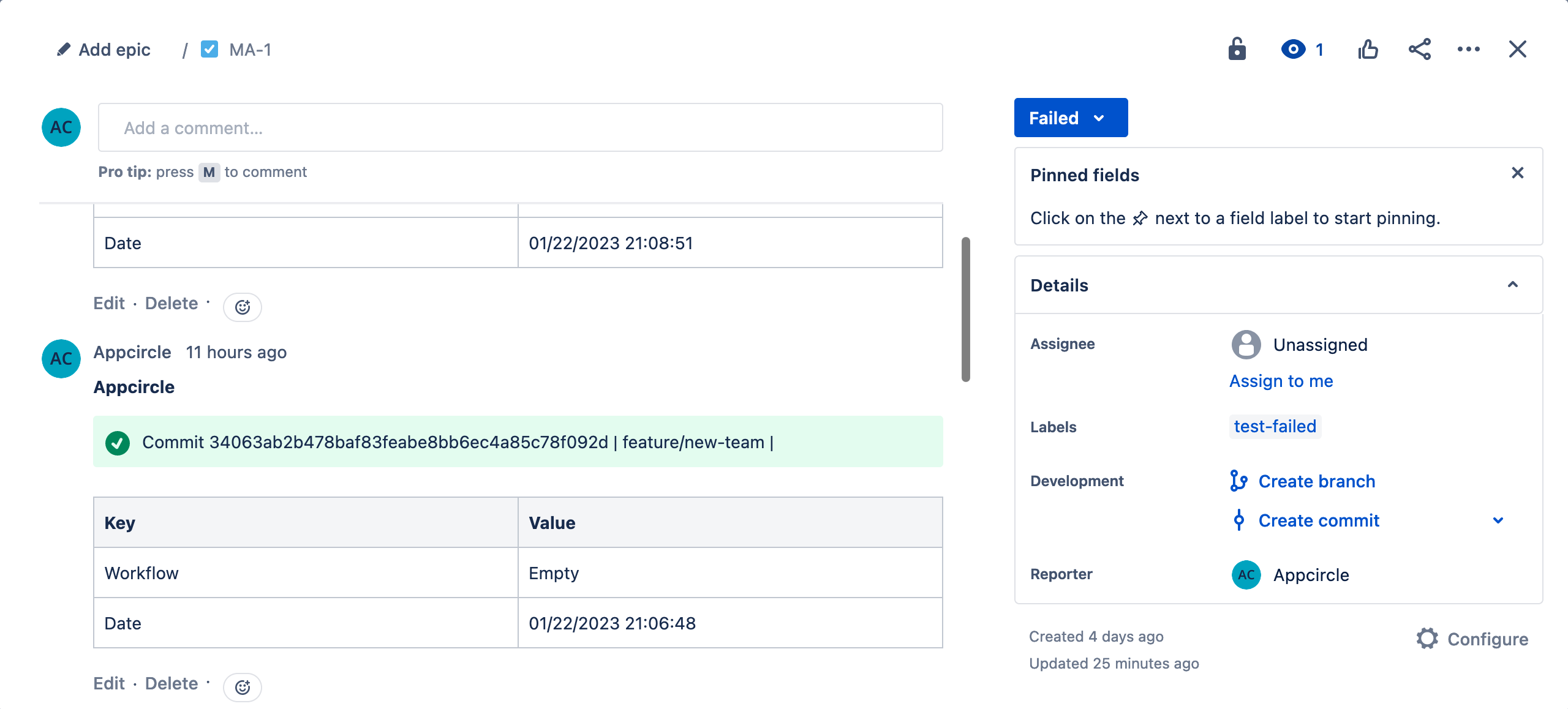
For more information about Jira Comment, please visit the Jira Comment step documentation. For more on getting the most out of Jira in your workflow, see our guide to using Jira for mobile app development.
Azure Boards
Teams working in Azure DevOps can keep their boards in sync the same way. The Azure Boards step adds a comment to the related work item and can change its state according to the result of your workflow. The default comment template carries the commit ID, branch name, and a couple of environment variables, and can be edited to match the Azure API. State changes are optional: name the states for successful and failed steps and the work item moves accordingly, or leave them empty and only the comment is posted.
Example Use Cases:
- Posting build results onto the work item that triggered them.
- Moving a work item back when the build fails.
- Customizing the comment template with HTML.
Keeping the board in step with the build removes manual status updates from the review process.
For more information about Azure Boards, please visit the Azure Boards step documentation. For a closer look at keeping work items in sync with mobile builds, see our guide to using Azure Boards for mobile app development.
Choosing What Runs Where: Three iOS Workflows
Running every tool above on every trigger would make a pull request slow enough that people start routing around it. In practice the work splits across three workflows, each with a different tolerance for how long it is allowed to take.
Pull request build
The developer is testing one change here, so the workflow stays on the repository and the compiled result. No explicit version increment is added, because the artifact is not intended for release.
- Git clone
- Static security scan: MobSF Source Code Scan, Snyk Scan Security
- Code quality scan: SwiftLint, SonarQube, Danger
- Unit testing: Xcodebuild for Unit and UI Testing, Test Reports for iOS
- Build: Xcodebuild for iOS Simulator
- Update issue tracking: Jira Comment, Azure Boards
Close it with Export Build Artifacts, so the generated scan and test reports can be accessed from the Download Artifacts page, provided each step writes its report to the export directory.
Push build
Once the change is on the main branch, the build becomes a package that could go to the App Store, so it is versioned, signed, and tested as one.
The scans and unit tests from the pull request workflow run here too, with the exception of Danger, which needs an open pull request to report into. After those, the steps that turn the result into a distributable package:
- Versioning: iOS Increment Build and Version Number
- Signing: Install Certificates and Provisioning Profiles
- Build: Xcodebuild for Devices
- UI testing: Xcodebuild for Testing
- Test automation, happy path: BrowserStack App Automate, Testinium
- Binary security scan: MobSF Binary Scan, Fortify on Demand Mobile Assessment
Signing comes before the build here, because Xcodebuild for Devices needs the certificate and provisioning profile in place to produce a signed IPA.
This workflow also produces artifacts for two different purposes. Xcodebuild for Devices produces the distributable IPA, which is what the binary scan should read, while Xcodebuild for Testing produces the app and UI test runner pair that BrowserStack consumes. Testinium works from the Xcodebuild for Devices output instead, so point each test automation step at the artifact its own documentation asks for.
Nightly build
The push workflow with the full test suite instead of a happy path, plus the assessments that take real time:
- Continuous security assessment: Data Theorem Mobile Secure
- Runtime protection testing: KOBIL Appshield Scanner
These assessments operate on a built application, with KOBIL specifically requiring a signed IPA. Running them overnight keeps the more extensive security checks outside the pull request review loop.
Split this way, a developer hears back within minutes of opening a request, the main branch always has a signed package behind it, and the slower assessments still run every day without anyone waiting on them.
Conclusion
Efficient pull requests and robust code reviews form the backbone of successful iOS development workflows. The tools in this article each cover a different part of that: style and structure, security, behavior, the package itself, and the record that ties it all back to your issue tracker.
What makes the difference in practice is that all of it runs in one place. The steps above live in the same workflow editor, on whichever triggers you choose, and with Set Commit Build Status enabled the outcome lands back on the pull request as a check. The same workflow model can also run on self-hosted Appcircle, subject to each integration's runner and network prerequisites.
For more iOS specific steps, please visit our iOS Integrations documentation.
For prioritization, notifications, and security checks that apply beyond iOS, see our guide to streamlining Pull Request workflows. For the Android side of code review, see our guide to Android code review practices.
Frequently Asked Questions
1. How do you review Objective-C source code for security issues?
Reading Objective-C line by line catches logic problems but rarely catches security patterns, which tend to repeat across projects and hide in code nobody is actively reviewing. A static analyzer is better suited to that job. MobSF Source Code Scan covers Swift and Objective-C, flags patterns such as leaked credentials, weak cryptography, and unsafe input handling, and maps each finding to CWE or OWASP MASVS so the team can judge how serious it is. Running it from the cloned repository means the results arrive in the pull request rather than after the build.
2. What tools help automate iOS code review?
Automation covers four separate jobs, and most teams need something for each. Danger enforces pull request rules such as descriptions, size limits, and missing tests. SwiftLint keeps style and conventions consistent, and Azure DevOps Bot for Swiftlint posts those findings onto the request for teams on Azure DevOps. SonarQube and MobSF handle static analysis, the first for code quality and the second for mobile security. Xcodebuild for Unit and UI Testing plus Test Reports for iOS cover behavior. What is left after that is the part worth a human reviewer's attention.
3. How can iOS builds be tested automatically on GitHub pull requests?
Appcircle's Pull Request triggers start a selected workflow when a pull request is opened or updated, and the build runs against the merge result, so the code being tested is the code that would land. A workflow with Xcodebuild for Unit and UI Testing runs the test suite on that result, and enabling Set Commit Build Status sends the outcome back to the repository provider, where it appears as a check on the pull request itself.